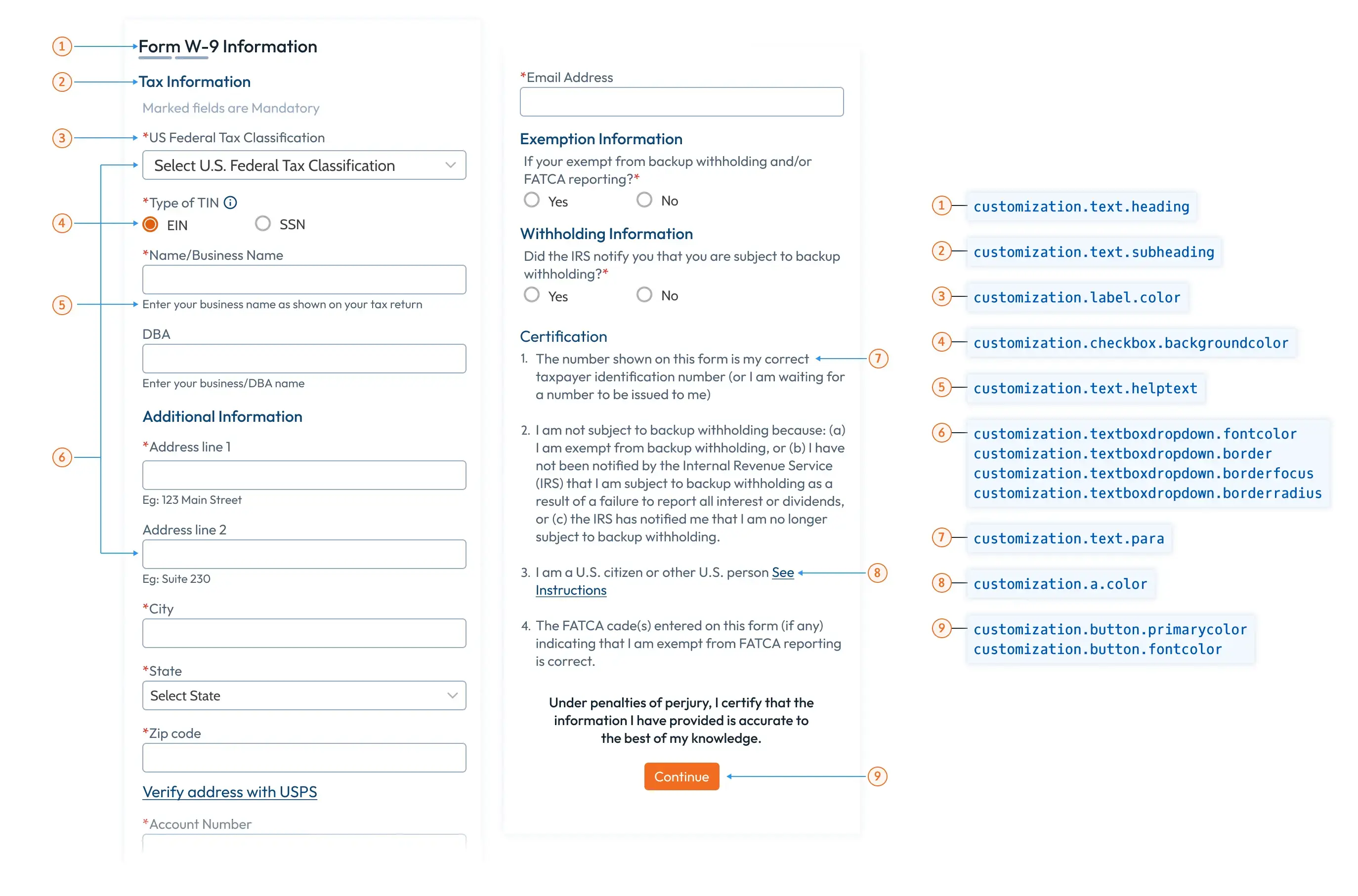
TaxBandits Drop-in UI offers several customization options to tailor the Form WHCertificate experience to match your platform. Below are the available fields for customization, including styling and redirection URLs.
Payer Customization
Requester
| Field | Description | Size Range |
|---|---|---|
| PayerRef | Optional A unique payer identifier for the business. | 1–50 characters |
| BusinessId | Optional TaxBandits' unique business identifier, generated when you create a payer through the Business API. If not provided, the first business created in your account is used. | GUID |
| TIN | Optional Taxpayer Identification Number (TIN). Can be used instead of BusinessId or PayerRef. | 1–11 characters |
| DBAId | Optional Unique identifier for the Doing Business As (DBA) name. | 1–50 characters |
| DBARef | Optional Unique reference for the DBA, used for future references. | 1–50 characters |
Recipient Customization
| Field | Description | Size Range |
|---|---|---|
| PayeeRef | Unique identifier for the recipient completing Form WHCertificate, used for future reference. | 1–50 characters |
| Name | Optional Recipient name. This will be pre-filled on the form. | Max. 40 chars |
| Address | Object containing recipient's US address details: | - |
| Address1 | Optional First line of the recipient's US address (street or P.O. box). | Max. 46 chars |
| Address2 | Optional Second line of the recipient's US address (suite, apartment, etc.). | Max. 46 chars |
| City | Optional Recipient's US city. This will be pre-filled on the form. | Max. 50 chars |
| State | Optional Recipient's US state code. This will be pre-filled on the form. | 2 characters, valid state codes |
| ZipCd | Optional Recipient's zip code. Format: 99999 or 99999-9999. This will be pre-filled on the form. | 5–10 characters |
TIN Matching
| Field | Description |
|---|---|
| IsTINMatching | Optional Set to True to enable TIN Matching. After the recipient submits Form W-9 via WHCertificate, TaxBandits will match the recipient’s name and SSN with the IRS database and notify you of the results via webhook. |
Textbox and Dropdown Customization
| Field | Description | Default Value |
|---|---|---|
| FontColor | Text color in the input fields. | #212529 |
| Border | Border color for input and dropdown fields. | #0000008a |
| BorderFocus | Border color when the input or dropdown is focused. | #86b7fe |
| BorderRadius | Shape of the input and dropdown fields. | 0.375rem |
Button Customization
| Field | Description | Default Value |
|---|---|---|
| Primarycolor | Color of primary buttons (e.g., Continue, Download). | #f26d21 |
| Secondarycolor | Color of secondary buttons (e.g., Cancel). | #3097f3 |
| Fontcolor | Button text color. | #000 |
Label Customization
| Field | Description | Default Value |
|---|---|---|
| Color | Color of the label text | #949494 |
Link Customization
| Field | Description | Default Value |
|---|---|---|
| Color | Color of the hyperlinks | #3097f3 |
Text Customization
| Field | Description | Default Value |
|---|---|---|
| Heading | Color of the primary heading text. | #212529 |
| SubHeading | Color of the secondary heading text. | #000000de |
| Para | Color of the paragraph and body text. | #000000de |
| HelpText | Color of help text. | #9e9e9e |
Redirect Urls
| Field | Description | Size Range |
|---|---|---|
| ReturnUrl | Optional URL to which the recipient will be redirected upon completing Form WHCertificate. | Max. 150 characters |
| CancelUrl | Optional URL to which the recipient will be redirected if they cancel the process. If not provided, the cancel button will not be displayed. | Max. 150 characters |