Form W-8BEN Status Change
This webhook can be configured to receive real-time notifications about the status of W-8BEN requests initiated from TaxBandits API. Applicable to FormW8BEN endpoint.
-
By default, the webhook response will include the recipient’s TIN. If you prefer not to include the TIN, you can adjust this preference in the console. See how
-
If you’ve used WhCertificate endpoint, please configure the webhook event type ‘WhCertificate Status Change’.
Steps to configure
-
Log in to Developer Console
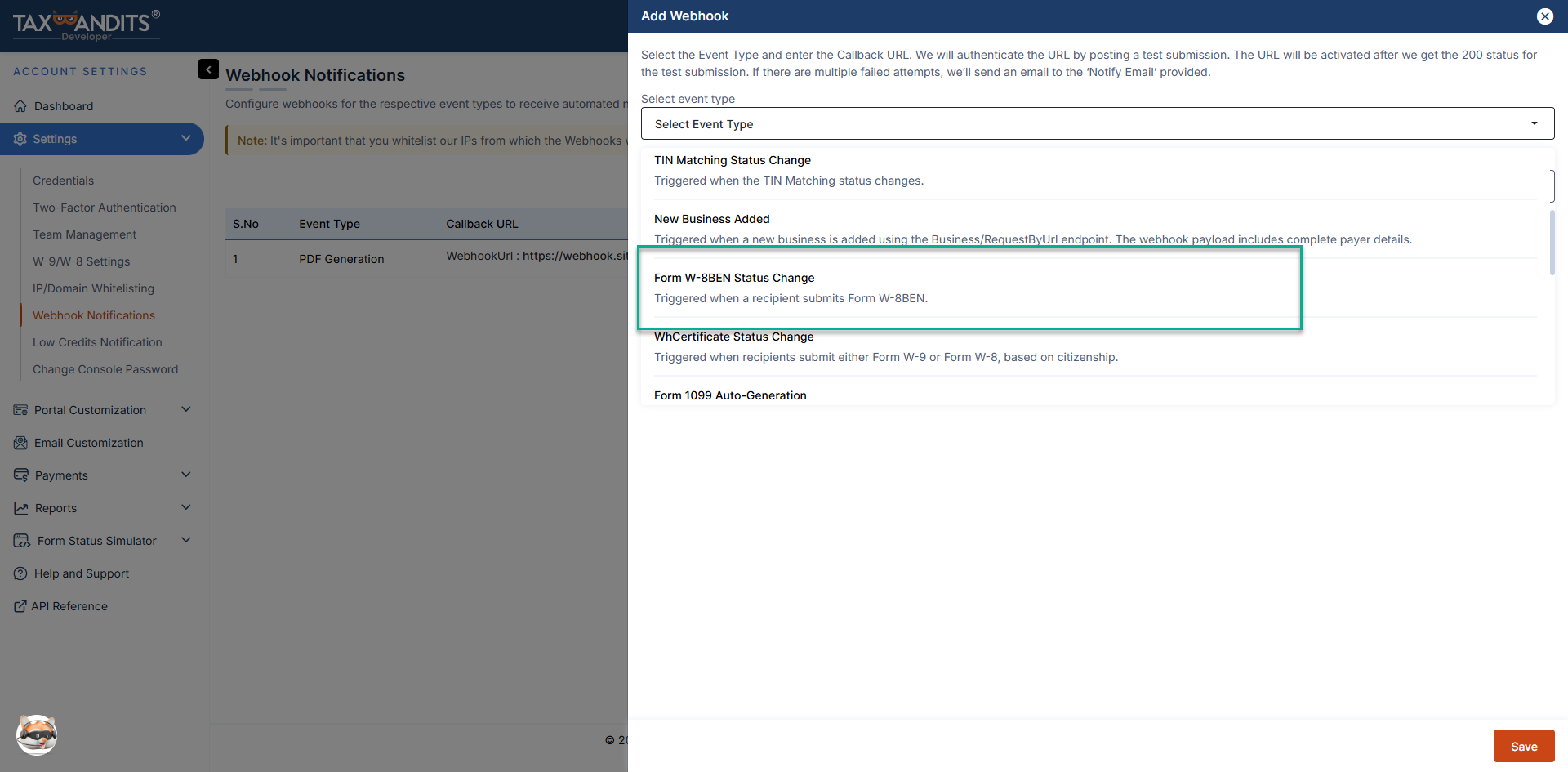
Navigate to 'Settings' → 'Webhook Notifications'. -
Add a webhook
Click 'Add Webhook' and select the event type 'Form W-8BEN Status Change'.
-
Provide a callback URL
Enter a valid HTTPS callback URL (maximum 500 characters). You can add upto 5 callback URLs in the TaxBandits Developer Console. Ensure that your callback URL follows these best practices.- The API validates this URL by sending a sample JSON payload.
- The webhook will be activated only after your endpoint responds with an HTTP 200 status code.
Instructions when using multiple callback URLs-
When you save a webhook in TaxBandits, a unique Webhook Reference (GUID) is generated for each callback URL you register.
-
Store these Webhook References on your end. When making API requests (for example, FormW8Ben/RequestByUrl), you can specify the preferred callback URL by including the corresponding WebhookRef in the request JSON.
-
The WebhookRef node is optional. If provided, webhook notifications for that request will be sent to the callback URL associated with the specified Webhook Reference.
-
If WebhookRef is not specified, webhook notifications will be sent to your default callback URL (typically Callback URL 1).
-
Configure a notification email
Provide a notification email address. TaxBandits will use this email to alert you if webhook delivery attempts fail.
Different Statuses
When the recipient submits the W-8BEN form, you’ll receive the below status.
- COMPLETED - The recipient has completed and signed the Form W8-BEN.
Receiving webhook requests
Once the webhook is configured and the callback URL is successfully authenticated, TaxBandits will send an HTTP POST request to your callback URL whenever a filing status changes.
Each request contains a JSON payload with submission details and record-level status information.
Sample webhook payload
    {
    "SubmissionId": "4a811a40-e2ff-47a6-9c11-8126f16badb4",
    "WebhookRef":"99db0874-e749-48d6-b96f-de6447d03667",
    "Requester": {
        "BusinessId": "16b7bb6c-1865-4740-9ef9-a0de62157af3",
        "PayerRef": "Snow123",
        "BusinessNm": "Snowdaze LLC",
        "FirstNm": null,
        "MiddleNm": null,
        "LastNm": null,
        "Suffix": null,
        "TINType": "EIN",
        "TIN": "83-3776789",
        "DBAId": null,
        "DBARef": null
    },
    "PayeeRef": "Pe6828",
    "RecipientId": "41228f6e-9640-4912-a9ab-8aece35bd7fa",
    "W8BENStatus": "COMPLETED",
    "StatusTs": "2024-11-25 01:44:19 -05:00",
    "FormW8BENRequestType": "URL_API",
    "PdfUrl": "https://s3.amazonaws.com/taxbandits-sb-api/4e1148fe-53bb-4018-8c39-c74297d3ebfc.Pdf",
    "Email": null,
    "FormData": {
        "NmOfIndividual": "Shawn Williams Sr",
        "FirstNm": "Shawn",
        "MiddleNm": null,
        "LastNm": "Williams",
        "Suffix": "Sr",
        "CitizenOfCountry": "Afghanistan",
        "USTINType": "SSN",
        "USTIN": "374-45-7836",
        "ForeignTIN": "27236572366",
        "IsFTINNotLegallyRequired": false,
        "ReferenceNum": "Pe6828",
        "DOB": null,
        "ExpiryDate": "12/31/2027",
        "PermanentAddress": {
            "Address1": "22 St",
            "Address2": "Clair Ave E",
            "City": "Toronto",
            "ProvinceOrStateNm": "Ontario",
            "Country": "Canada",
            "PostalCd": "M1R 0E9"
        },
        "MailingAddress": {
            "Address1": "22 St",
            "Address2": "Clair Ave E",
            "City": "Toronto",
            "ProvinceOrStateNm": "Ontario",
            "Country": "Canada",
            "PostalCd": "M1R 0E9"
        },
        "TaxTreatyBenefits": {
            "BeneficiaryCountry": null,
            "ClaimingProvArticlePara": null,
            "RateOfWH": "0.0",
            "TypeOfIncome": null,
            "AdditionalConditions": null
        },
        "Signature": {
            "SignerNm": "Shawn "
        }
    },
    "Errors": null
}
Responding to webhook requests
Your application must respond with HTTP 200 OK to acknowledge receipt of a webhook request.
- Any response other than 200 is treated as a failed delivery
- HTTP redirects (301) are not supported and are treated as errors
- Your endpoint must respond within 5 seconds, or the request is considered a timeout
If a webhook delivery fails or times out, TaxBandits will retry the request up to 9 times within 24 hours.
Validating webhook requests
Before processing a webhook payload, you must verify that the request originated from TaxBandits.Refer to the Webhook validation documentation to learn how to authenticate incoming webhook requests.