Webhook
Use webhooks to receive automatic status updates when a recipient opens, completes, or submits a W-9/W-8 form. Instead of checking the status manually, TaxBandits sends the update directly to your callback URL.
Here are the steps to configure webhooks for Form W-9/W-8 status
1. Log in to the Developer Console
Go to the appropriate console based on your environment:
| Environment | URL |
|---|---|
| Sandbox | sandbox.taxbandits.com |
| Live | console.taxbandits.com |
2. Go to Webhook Settings
From the Developer Console, navigate to Settings > Webhooks. Then click Add Webhook.
3. Select the Event Type
Choose the event type: WHCertificate Status Change. This event notifies your system whenever the recipient's W-9/W-8 form status changes.
4. Add Your Callback URL
Enter the callback URL where TaxBandits should send webhook notifications.
Your callback URL must be:
- Publicly accessible
- Able to receive POST requests
- Configured to return HTTP
200
When TaxBandits sends a sample or live webhook payload, your server must return an HTTP status code 200. If your server does not return 200, the webhook will become inactive. You can retry the sample payload from the Developer Console to reactivate it.
5. Save the Webhook
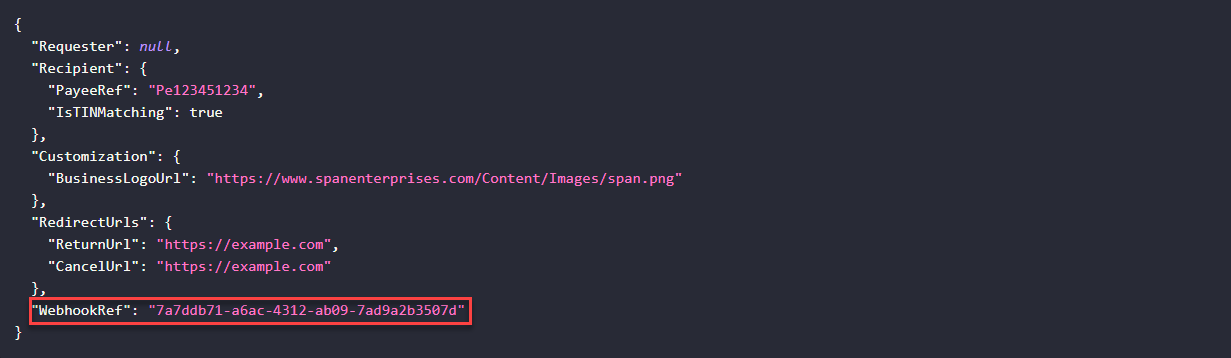
After saving, TaxBandits generates a unique WebhookRef for that callback URL.
Store this WebhookRef in your system. You can use it later to decide which callback URL should receive updates for a specific WhCertificate request.
6. Use WebhookRef in API Requests
When making WHCertificate API requests, such as WhCertificate/RequestByUrl, you can include the WebhookRef.
If you include WebhookRef, updates will be sent to the callback URL linked to that reference.
If you do not include WebhookRef, updates will be sent to your default callback URL.
7. Receive Status Updates
Once configured, TaxBandits sends webhook notifications whenever the WHCertificate status changes.
The webhook may include:
- Recipient name
- Address
- TIN
- Form type
- Form status
- TIN Matching status
- Submission timestamp
- Secure PDF download link
Request JSON with WebhookRef
Response Body
| Field | Type | Description |
|---|---|---|
| FormType | String | Type of Form (W-9 or W-8BEN). |
| WebhookRef | Guid |
|
| FormW9 | Object | Contains Form W-9 Information. |
| SubmissionId | Guid | A unique identifier of a submission. |
| Requester | Object | Requester information. |
| BusinessId | Guid | A unique identifier of the business. |
| BusinessNm | String | Requester Name. If the requester is a Business, then the Business Name will be returned. If the requester is an Individual, then the Payer’s full name will be returned. |
| TINType | String | TIN Type of the Requester. |
| TIN | String | Taxpayer Identification Number of the requester. |
| DBAId | String | Unique Identifier for the DBA. |
| DBARef | String | Unique identifier for each DBA. This identifier can be used in future references of the DBA in the API. |
| PayeeRef | String | A unique identifier of the recipient |
| RecipientId | Guid | A unique ID generated by TaxBandits after the return is created and will be returned in the Response. You can use this ID for future reference to update. |
| W9Status | String | Status of the W-9 |
| StatusTs | String | Timestamp of the W-9 Status |
| TINMatching | Object | TIN Matching information. |
| Status | String | TIN Matching status. |
| StatusTs | String | Timestamp of the TIN Matching Status. |
| Errors | String | Shows the detailed error message. |
| FormW9RequestType | String | Form W-9 requested Type.
|
| PdfUrl | String | The URL to download the completed W-9. Note: This URL will expire in 24 hours. |
| String | Email Address of the recipient. This is the email to which the W-9 request was sent. The value will be null if the Form W-9 was requested using the RequestByURL method. | |
| Phone | String | The phone number of the recipient |
| CountryPhoneCode | String | Recipient’s country code. |
| FormData | Object | Form W-9 data of the recipient |
| Line1Nm | string | Name as shown on the income tax return |
| Line2Nm | string | Business name/disregarded entity name, if different from Line1 Name |
| TINType | string | TIN type of the recipient. |
| TINType | string | TIN type of the recipient. |
| TIN | string | Recipient’s TIN |
| Address | Object | Recipient’s complete address |
| Address1 | string | Recipient’s Address 1 (street address or post office box of that locality). This will be pre-filled on the Form. |
| Address2 | string | Recipient’s Address 2 (suite or apartment number). This will be pre-filled on the Form. |
| City | string | Recipient’s City |
| State | string | Recipient’s State |
| ZipCd | string | Recipient’s Zip Code Size Range: 5..10 |
| Country | string | Recipient's country code. Refer to Static values. Size Range: 2 Allowed values"AF", "AX", "AL", "AG", "AQ", "AN", "AO", "AV", "AY", "AC", "AR", "AM", "AA", "AT", "AS", "AU", "AJ", "BF", "BA", "FQ", "BG", "BB", "BO", "BE", "BH", "BN", "BD", "BT", "BL", "BK", "BC", "BV", "BR", "IO", "VI", "BX", "BU", "UV", "BM", "BY", "CB", "CM", "CA", "CV", "CJ", "CT", "CD", "CI", "CH", "KT", "IP", "CK", "CO", "CN", "CF", "CG", "CW", "CR", "CS", "IV", "HR", "CU", "UC", "CY", "EZ", "DA", "DX", "DJ", "DO", "DR", "TT", "EC", "EG", "ES", "EK", "ER", "EN", "ET", "FK", "FO", "FM", "FJ", "FI", "FR", "FP", "FS", "GB", "GA", "GG", "GM", "GH", "GI", "GR", "GL", "GJ", "GQ", "GT", "GK", "GV", "PU", "GY", "HA", "HM", "VT", "HO", "HK", "HQ", "HU", "IC", "IN", "ID", "IR", "IZ", "EI", "IS", "IT", "JM", "JN", "JA", "DQ", "JE", "JQ", "JO", "KZ", "KE", "KQ", "KR", "KN", "KS", "KV", "KU", "KG", "LA", "LG", "LE", "LT", "LI", "LY", "LS", "LH", "LU", "MC", "MK", "MA", "MI", "MY", "MV", "ML", "MT", "IM", "RM", "MR", "MP", "MX", "MQ", "MD", "MN", "MG", "MJ", "MH", "MO", "MZ", "WA", "NR", "BQ", "NP", "NL", "NC", "NZ", "NU", "NG", "NI", "NE", "NF", "CQ", "NO", "MU", "OC", "PK", "PS", "LQ", "PM", "PP", "PF", "PA", "PE", "RP", "PC", "PL", "PO", "RQ", "QA", "RO", "RS", "RW", "TB", "RN", "WS", "SM", "TP", "SA", "SG", "RI", "SE", "SL", "SN", "NN", "LO", "SI", "BP", "SO", "SF", "SX", "OD", "SP", "PG", "CE", "SH", "SC", "ST", "SB", "VC", "SU", "NS", "SV", "WZ", "SW", "SZ", "SY", "TW", "TI", "TZ", "TH", "TO", "TL", "TN", "TD", "TS", "TU", "TX", "TK", "TV", "UG", "UP", "AE", "UK", "UY", "UZ", "NH", "VE", "VM", "VQ", "WQ", "WF", "WI", "YM", "ZA", "ZI" |
| AccountNum | string | Recipient’s account number. You can use this field to enter any identification number you have for the recipient. |
| FederalTaxClassification | string | U.S. Federal Tax Classification of the person whose name is entered on Line 1 |
| IsLine3b | Boolean | If TRUE, identifies that the recipient is
|
| ExemptPayeeCd | string | This code identifies the recipient is exempt from backup withholding |
| ExemptFromFATCA | string | This code identifies recipients that are exempt from reporting under FATCA. |
| IsBackUpWH | Boolean | If True identifies that the recipient have been notified by the Internal Revenue Service (IRS) that they are subject to backup withholding. |
| IsDAExemptBroker | Boolean | When true, identifies the recipient is exempt from information reporting as a U.S. digital asset broker within the meaning of Regulations section 1.6045-1(g)(4)(i)(A)(1) |
| Errors | Object | Shows detailed error information. |
| Id | String | Error ID number. This ID is assigned by TaxBandits and it is unique for each error. |
| Name | String | Name of the errored node. |
| Message | String | Shows the error message. |
| FormW8Ben | Object | Form W-8BEN Information. |
| SubmissionId | Guid | A Unique identifier of a submission. |
| Requester | Object | Requester information. |
| BusinessId | Guid | A unique identifier of the business. |
| BusinessNm | String | Business Name of the requester. If the requester is an Individual, then the Payer’s full name will be returned. |
| TINType | String | TIN Type of the Requester. |
| TIN | String | Taxpayer Identification Number of the requester. |
| PayeeRef | String | A Unique identifier of the recipient |
| W8BENStatus | String | Status of the W-8BEN. |
| StatusTs | String | Timestamp of the W-8BEN Status. |
| FormW8BENRequestType | String | Form W-8BEN requested Type.
|
| PdfUrl | String | The URL to download the completed W-8BEN. Note: This URL will expire in 24 hours. |
| String | Email Address of the recipient. This is the email to which the W-8BEN request was sent. The value will be null if the Form W-8BEN was requested using the RequestByURL method. | |
| Phone | String | The phone number of the recipient |
| CountryPhoneCode | String | Recipient’s country code. |
| FormData | Object | Form W-8BEN data of the recipient. |
| NmOfIndividual | string | Name of the Foreign Individual. |
| CitizenOfCountry | string | Recipient country of citizenship. |
| USTINType | string | TIN type of the recipient. (Either SSN or ITIN) |
| USTIN | string | Recipient’s TIN |
| ForeignTIN | string | Foreign TIN of the recipient. |
| IsFTINNotLegallyRequired | Boolean | When true, Identifies that beneficial owner on line 1 is not legally required to obtain an FTIN from their jurisdiction of residence. |
| ReferenceNum | string | Recipient’s reference number. You can use this field to enter any identification number you have for the recipient. |
| DOB | string | Date of Birth of the recipient |
| PermanentAddress | Object | Recipient’s permanent address. |
| Address | string | Recipient’s Address. |
| City | string | Recipient’s City |
| State | string | Recipient’s State |
| Country | string | Recipient’s Country |
| PostalCd | string | Recipient’s Zip Code |
| MailingAddress | Object | Recipient’s mailing address. |
| Address | string | Recipient’s Address. |
| City | string | Recipient’s City |
| State | string | Recipient’s State |
| Country | string | Recipient’s Country |
| PostalCd | string | Recipient’s Zip Code |
| TaxTreatyBenefits | Object | Tax Treaty Benefits. |
| BeneficiaryCountry | string | Country where the recipient claim to be a resident for income tax treaty purposes |
| ClaimingProvArticlePara | string | Article and paragraph of the treaty benefits |
| RateOfWH | string | Rate of Withholding. |
| TypeOfIncome | string | Type of income for which recipient claims the treaty benefits. |
| AdditionalConditions | string | Additional conditions from the tax treaty benefits. |
| Signature | Object | Signature of the recipient. |
| SignerNm | string | Name of the signer. |
| CapacityInWhichActing | string | If the form is signed by an agent on the individual’s behalf, enter the capacity in which they are acting. |
| Errors | Object | Shows detailed error information. |
| Id | String | Error ID number. This ID is assigned by TaxBandits and it is unique for each error. |
| Name | String | Name of the errored node. |
| Message | String | Shows the error message. |
| FormW8BenE | Object | Contains Form W-8BEN-E Information. |
| SubmissionId | Guid | A unique identifier of a submission. |
| Requester | Object | Requester information. |
| BusinessId | Guid | A unique identifier of the business. |
| PayerRef | String | A unique payer identifier that you will assign |
| BusinessNm | String | The Business name of the requester. If the requester is an Individual, then the Payer's full name will be returned. |
| FirstNm | String | First Name of the Individual |
| LastNm | String | Last Name of the individual |
| MiddleNm | String | Middle Name of the Individual |
| Suffix | String | Suffix of the Individual |
| TINType | String | TIN Type of the Requester. |
| TIN | String | Taxpayer Identification Number of the requester. |
| DBAId | String | Unique Identifier for the DBA. |
| DBARef | String | Unique identifier for each DBA. This identifier can be used in future references of the DBA in the API. |
| PayeeRef | String | A unique identifier of the recipient |
| W8BENEStatus | String | Status of the W-8BEN-E. |
| StatusTs | String | Timestamp of the W-8BEN-E Status. |
| FormW8BENERequestType | String | Form W-8BEN-E requested Type.
|
| PdfUrl | String | The URL to download the completed W-8BEN-E. Note: This URL will expire in 24 hours. |
| String | Email Address of the recipient. This is the email to which the W-8BEN-E request was sent. The value will be null if the Form W-8BEN-E was requested using the RequestByURL method. | |
| Phone | String | The phone number of the recipient |
| CountryPhoneCode | String | Recipient’s country code. |
| FormData | Object | Form W-8BEN-E data of the recipient. |
| Part1 | Object | Beneficial Owner Information |
| NmOfOrganization | String | Name of the Organization. |
| CountryOfOrganization | String | Country of the Organization. |
| NmOfDisregardedEntity | String | Business name/disregarded entity name, if different from Organization's name |
| Ch3Status | String | The entity's Chapter 3 status for withholding purposes under U.S. tax law. |
| IsEntityTreatyClaim | Boolean | When true, identifies that the entity is a hybrid making a treaty claim Note: Applicable only if the Chapter 3 status is Disregarded Entity, Partnership, Simple Trust, or Grantor Trust |
| Ch4Status | String | The entity's Chapter 4 status for withholding purposes under U.S. tax law. |
| USTINType | String | TIN type of the recipient. |
| USTIN | String | Recipient's TIN |
| GIIN | String | Entity's GIIN |
| ForeignTIN | String | Foreign TIN of the recipient. |
| IsFTINNotLegallyRequired | Boolean | When true, identifies that beneficial owner on line 1 is not legally required to obtain an FTIN from their jurisdiction of residence. |
| ReferenceNum | String | Recipient's reference number. You can use this field to enter any identification number you have for the recipient. |
| ExpiryDate | String | Date of form W-8BEN-E expiration |
| PermanentAdd | Object | Recipient's permanent address. |
| Address1 | String | Recipient's Address 1 (number, street) |
| Address2 | String | Recipient's Address 2 (apt. or suite no.) |
| City | String | Recipient's City |
| State | String | Recipient's State |
| Country | String | Recipient's Country |
| PostalCd | String | Recipient's Zip Code |
| MailAdd | Object | Recipient's mailing address. |
| Address1 | String | Recipient's Address 1 (number, street) |
| Address2 | String | Recipient's Address 2 (apt. or suite no.) |
| City | String | Recipient's City |
| State | String | Recipient's State |
| Country | String | Recipient's Country |
| PostalCd | String | Recipient's Zip Code |
| Part2 | Object | Disregarded Entity or Branch Receiving Payment information |
| Ch4StatusOfDisregardedEntity | String | Chapter 4 Status (FATCA status) of disregarded entity or branch receiving payment |
| AddOfDisregardedEntity | Object | Disregarded entity's address |
| Address1 | String | Disregarded Entity's Address 1 |
| Address2 | String | Disregarded Entity's Address 2 |
| City | String | Disregarded Entity's City |
| State | String | Disregarded Entity's State |
| Country | String | Disregarded Entity's Country |
| PostalCd | String | Disregarded Entity's ZipCode |
| GIIN | String | Entity's GIIN |
| Part3 | Object | Tax treaty information |
| IsBeneficiaryCountryTreatedWithin | Boolean | When true, identifies the beneficial owner as a resident of a country with which the United States has an income tax treaty. |
| BeneficiaryCountry | String | Country where the recipient claim to be a resident for income tax treaty purposes. |
| IsBeneficiaryClaimingTreatyBenefits | Boolean | When true, identifies that the beneficial owner is claiming treaty benefits for US source of dividends received from a foreign corporation or interest from a U.S. trade or business of a foreign corporation and meets qualified resident status |
| LimitationOnBenefits | String | Type of limitation on benefits provisions that are included in an applicable tax treaty |
| OtherDetail | String | Other limitation on benefits provisions information (Article and Paragraph) |
| IsBenifitsForUSSourceFromForeignCorp | Boolean | When true, Identifies the beneficial owner is claiming treaty benefits for U.S. source dividends received from a foreign corporation or interest from a U.S. trade or business of a foreign corporation and meets qualified resident status |
| ClaimingProvArticlePara | String | Article and paragraph of the treaty benefits. |
| RateOfWH | String | Rate of Withholding. |
| TypeOfIncome | String | Type of income for which recipient claims the treaty benefits. |
| AdditionalConditions | String | Additional conditions from the tax treaty benefits. |
| Part4 | Object | Sponsored FFI information |
| NmOfSponsoringEntity | String | Name of the sponsoring entity |
| Line17Box1 | Boolean | When true, Identifies the entity in Part I: 1. Is an investment entity; 2. Is not a QI, WP (except to the extent permitted in the withholding foreign partnership agreement), or WT; and 3. Has agreed with the entity identified above (that is not a nonparticipating FFI) to act as the sponsoring entity for this entity. |
| Line17Box2 | Boolean | when true, Identifies the entity in the Part I: 1. Is a controlled foriegn corporation as defined in section 957(a) 2. Is not a QI, WP, or WT and 3. Is wholly owned, directly or indirectly, by the U.S. financial institution identified above that agrees to act as the sponsoring entity for this entity; and 4. Shares a common electronic account system with the sponsoring entity (identified above) that enables the sponsoring entity to identify all account holders and payees of the entity and to access all account and customer information maintained by the entity including, but not limited to, customer identification information, customer documentation, account balance, and all payments made to account holders or payees. |
| Part5 | Object | Certified deemed-compliant nonregistering local bank information |
| Line18 | Boolean | When true, identifies the FFI in Part I: 1. Operates and is licensed solely as a bank or credit union (or similar cooperative credit organization operated without profit) in its country of incorporation or organization; 2. Engages primarily in the business of receiving deposits from and making loans to, with respect to a bank, retail customers unrelated to such bank and, with respect to a credit union or similar cooperative credit organization, members, provided that no member has a greater than 5% interest in such credit union or cooperative credit organization; 3. Does not solicit account holders outside its country of organization; 4. Has no fixed place of business outside such country (for this purpose, a fixed place of business does not include a location that is not advertised to the public and from which the FFI performs solely administrative support functions); 5. Has no more than $175 million in assets on its balance sheet and, if it is a member of an expanded affiliated group, the group has no more than $500 million in total assets on its consolidated or combined balance sheets; and 6. Does not have any member of its expanded affiliated group that is a foreign financial institution, other than a foreign financial institution that is incorporated or organized in the same country as the FFI identified in Part I and that meets the requirements set forth in this part. |
| Part6 | Object | Certified deemed-compliant FFI with only low-value accounts information |
| Line19 | Boolean | When true,identifies the FFI in Part I: 1. Is not engaged primarily in the business of investing, reinvesting, or trading in securities, partnership interests, commodities, notional principal contracts, insurance or annuity contracts, or any interest (including a futures or forward contract or option) in such security, partnership interest, commodity, notional principal contract, insurance contract or annuity contract; 2. No financial account maintained by the FFI or any member of its expanded affiliated group, if any, has a balance or value in excess of $50,000 (as determined after applying applicable account aggregation rules); and 3. Neither the FFI nor the entire expanded affiliated group, if any, of the FFI, have more than $50 million in assets on its consolidated or combined balance sheet as of the end of its most recent accounting year. |
| Part7 | Object | Certified deemed-sponsored, closely held investment vehicle information |
| NmOfSponsoringEntity | String | Name of the sponsoring entity |
| Line21 | Boolean | When true, identifies that the entity in Part I: 1. Is an FFI solely because it is an investment entity described in Regulations section 1.1471-5(e)(4); 2. Is not a QI, WP, or WT; 3. Will have all of its due diligence, withholding, and reporting responsibilities (determined as if the FFI were a participating FFI) fulfilled by the sponsoring entity identified on line 20; and 4. 20 or fewer individuals own all of the debt and equity interests in the entity (disregarding debt interests owned by U.S. financial institutions, participating FFIs, registered deemed-compliant FFIs, and certified deemed-compliant FFIs and equity interests owned by an entity if that entity owns 100% of the equity interests in the FFI and is itself a sponsored FFI). |
| Part8 | Object | Certified deemed-compliant limited life debt investment entity information |
| Line22 | Boolean | When true, identifies the entity in Part I: 1. Was in existence as of January 17, 2013; 2. Issued all classes of its debt or equity interests to investors on or before January 17, 2013, pursuant to a trust indenture or similar agreement; and 3. Is certified deemed-compliant because it satisfies the requirements to be treated as a limited life debt investment entity (such as the restrictions with respect to its assets and other requirements under regulations section 1.1471-5(f)(2)(iv)). |
| Part9 | Object | Certain investment entities that do not maintain financial accounts information |
| Line23 | Boolean | When true, identifies the entity in Part I: 1. Is a financial institution solely because it is an investment entity described in Regulations section 1.1471-5(e)(4)(i)(A), and 2. Does not maintain financial accounts. |
| Part10 | Object | Owner-Documented FFI information |
| Line24a | Boolean | When true, identifies the FFI in Part I: 1. Does not act as an intermediary; 2. Does not accept deposits in the ordinary course of a banking or similar business; 3. Does not hold, as a substantial portion of its business, financial assets for the account of others; 4. Is not an insurance company (or the holding company of an insurance company) that issues or is obligated to make payments with respect to a financial account; 5. Is not owned by or in an expanded affiliated group with an entity that accepts deposits in the ordinary course of a banking or similar business, holds, as a substantial portion of its business, financial assets for the account of others, or is an insurance company (or the holding company of an insurance company) that issues or is obligated to make payments with respect to a financial account; 6. Does not maintain a financial account for any nonparticipating FFI; and 7. Does not have any specified U.S. persons that own an equity interest or debt interest (other than a debt interest that is not a financial account or that has a balance or value not exceeding $50,000) in the FFI other than those identified on the FFI owner reporting statement. |
| Line24b | Boolean | When true, identifies the FFI identified in Part I: 1. Has provided, or will provide, an FFI owner reporting statement that contains: (i) The name, address, TIN (if any), chapter 4 status, and type of documentation provided (if required) of every individual and specified U.S. person that owns a direct or indirect equity interest in the owner- documented FFI (looking through all entities other than specified U.S. persons); (ii) The name, address, TIN (if any), and chapter 4 status of every individual and specified U.S. person that owns a debt interest in the owner-documented FFI (including any indirect debt interest, which includes debt interests in any entity that directly or indirectly owns the payee or any direct or indirect equity interest in a debt holder of the payee) that constitutes a financial account in excess of $50,000 (disregarding all such debt interests owned by participating FFIs, registered deemed-compliant FFIs, certified deemedcompliant FFIs, excepted NFFEs, exempt beneficial owners, or U.S. persons other than specified U.S. persons); and (iii) Any additional information the withholding agent requests in order to fulfill its obligations with respect to the entity. 2. Has provided, or will provide, valid documentation meeting the requirements of Regulations section 1.1471-3(d)(6)(iii) for each person identified in the FFI owner reporting statement. |
| Line24c | Boolean | When true, identifies that the FFi identified in Part I has provided, or will provide, an auditor's letter, signed within 4 years of the date of payment, from an independent accounting firm or legal representative with a location in the United States stating that the firm or representative has reviewed the FFI's documentation with respect to all of its owners and debt holders identified in Regulations section 1.1471-3(d)(6)(iv)(A)(2), and that the FFI meets all the requirements to be an owner-documented FFI. The FFI identified in Part I has also provided, or will provide, an FFI owner reporting statement of its owners that are specified U.S. persons and Form(s) W-9, with applicable waivers. |
| Line24d | Boolean | When true, identifies the entity identified on line 1 is a trust that does not have any contingent beneficiaries or designated classes with unidentified beneficiaries |
| Part11 | Object | Restricted distributor information |
| Line25a | Boolean | When true, identifies the entity identified in Part I: 1. Operates as a distributor with respect to debt or equity interests of the restricted fund with respect to which this form is furnished; 2. Provides investment services to at least 30 customers unrelated to each other and less than half of its customers are related to each other; 3. Is required to perform AML due diligence procedures under the anti-money laundering laws of its country of organization (which is an FATFcompliant jurisdiction); 4. Operates solely in its country of incorporation or organization, has no fixed place of business outside of that country, and has the same country of incorporation or organization as all members of its affiliated group, if any; 5. Does not solicit customers outside its country of incorporation or organization; 6. Has no more than $175 million in total assets under management and no more than $7 million in gross revenue on its income statement for the most recent accounting year; 7. Is not a member of an expanded affiliated group that has more than $500 million in total assets under management or more than $20 million in gross revenue for its most recent accounting year on a combined or consolidated income statement; and 8. Does not distribute any debt or securities of the restricted fund to specified U.S. persons, passive NFFEs with one or more substantial U.S. owners, or nonparticipating FFIs. |
| Line25b | Boolean | When true, identifies the entity in Part I has been bound by a distribution agreement that contained a general prohibition on the sale of debt or securities to U.S. entities and U.S. resident individuals and is currently bound by a distribution agreement that contains a prohibition of the sale of debt or securities to any specified U.S. person, passive NFFE with one or more substantial U.S. owners, or nonparticipating FFI. |
| Line25c | Boolean | When true, identifies the entity in Part I is currently bound by a distribution agreement that contains a prohibition on the sale of debt or securities to any specified U.S. person, passive NFFE with one or more substantial U.S. owners, or nonparticipating FFI and, for all sales made prior to the time that such a restriction was included in its distribution agreement, has reviewed all accounts related to such sales in accordance with the procedures identified in Regulations section 1.1471-4(c) applicable to preexisting accounts and has redeemed or retired any, or caused the restricted fund to transfer the securities to a distributor that is a participating FFI or reporting Model 1 FFI securities which were sold to specified U.S. persons, passive NFFEs with one or more substantial U.S. owners, or nonparticipating FFIs. |
| Part12 | Object | Nonreporting IGA FFI information |
| Line26 | Boolean | When true, identifies the entity in Part I meets the requirements to be considered a nonreporting financial institution pursuant to an applicable IGA between the United States and country of residence and is treated as a FFI under the provisions of the applicable IGA or Treasury regulations |
| NmOfCountry | String | The name of the jurisdiction that has the IGA treated as in effect with the United States |
| IGAModel | String | Type of IGA model |
| TreatedAs | String | Provisions under which the applicable IGA or Treasury regulations applicable |
| NmOfTrusteeOrSponsor | String | Name of trustee or sponsor |
| IsTrusteeUS | Boolean | When true, identifies the Trustee or sponsor is a US citizen |
| Part13 | Object | Foreign government, government of a U.S Possesion, or foreign central bank of issue information |
| Line27 | Boolean | When true, identifies the entity in Part I is the beneficial owner of the payment, and is not engaged in commercial financial activities of a type engaged in by an insurance company, custodial institution, or depository institution with respect to the payments, accounts, or obligations for which this form is submitted (except as permitted in Regulations section 1.1471-6(h)(2)) |
| Part14 | Object | International organization infromation |
| Line28a | Boolean | When true, identifies the entity in Part I is the international organization described in section 7701(a)(18). |
| Line28b | Boolean | When true, identifies the entity in Part I: 1. Is comprised primarily of foreign governments; 2. Is recognized as an intergovernmental or supranational organization under a foreign law similar to the International Organizations Immunities Act or that has in effect a headquarters agreement with a foreign government; 3. The benefit of the entity's income does not inure to any private person; and 4. Is the beneficial owner of the payment and is not engaged in commercial financial activities of a type engaged in by an insurance company, custodial institution, or depository institution with respect to the payments, accounts, or obligations for which this form is submitted (except as permitted in Regulations section 1.1471-6(h)(2)). |
| Part15 | Object | Exempt retirement plans information |
| Line29a | Boolean | When true, identifies the entity in Part I: 1.Is established in a country with which the United States has an income tax treaty in force (see Part III if claiming treaty benefits); 2. Is operated principally to administer or provide pension or retirement benefits; and 3. Is entitled to treaty benefits on income that the fund derives from U.S. sources (or would be entitled to benefits if it derived any such income) as a resident of the other country which satisfies any applicable limitation on benefits requirement. |
| Line29b | Boolean | When true, identifies the entity in Part I: 1. Is organized for the provision of retirement, disability, or death benefits (or any combination thereof) to beneficiaries that are former employees of one or more employers in consideration for services rendered; 2. No single beneficiary has a right to more than 5% of the FFI's assets; 3. Is subject to government regulation and provides annual information reporting about its beneficiaries to the relevant tax authorities in the country in which the fund is established or operated; and (i) Is generally exempt from tax on investment income under the laws of the country in which it is established or operates due to its status as a retirement or pension plan; (ii) Receives at least 50% of its total contributions from sponsoring employers (disregarding transfers of assets from other plans described in this part, retirement and pension accounts described in an applicable Model 1 or Model 2 IGA, other retirement funds described in an applicable Model 1 or Model 2 IGA, or accounts described in Regulations section 1.1471-5(b)(2)(i)(A)); (iii) Either does not permit or penalizes distributions or withdrawals made before the occurrence of specified events related to retirement, disability, or death (except rollover distributions to accounts described in Regulations section 1.1471-5(b)(2)(i)(A) (referring to retirement and pension accounts), to retirement and pension accounts described in an applicable Model 1 or Model 2 IGA, or to other retirement funds described in this part or in an applicable Model 1 or Model 2 IGA); or (iv) Limits contributions by employees to the fund by reference to earned income of the employee or may not exceed $50,000 annually. |
| Line29c | Boolean | When true, identifies the entity in Part I: 1.Is organized for the provision of retirement, disability, or death benefits (or any combination thereof) to beneficiaries that are former employees of one or more employers in consideration for services rendered; 2. Has fewer than 50 participants; 3. Is sponsored by one or more employers each of which is not an investment entity or passive NFFE; 4. Employee and employer contributions to the fund (disregarding transfers of assets from other plans described in this part, retirement and pension accounts described in an applicable Model 1 or Model 2 IGA, or accounts described in Regulations section 1.1471-5(b)(2)(i)(A)) are limited by reference to earned income and compensation of the employee, respectively; 5. Participants that are not residents of the country in which the fund is established or operated are not entitled to more than 20% of the fund's assets; and 6. Is subject to government regulation and provides annual information reporting about its beneficiaries to the relevant tax authorities in the country in which the fund is established or operates. |
| Line29d | Boolean | When true, identifies the entity in Part 1 is formed pursuant to a pension plan that would meet the requirements of section 401(a), other than the requirement that the plan be funded by a trust created or organized in the United States. |
| Line29e | Boolean | When true, identifies the entity in Part 1 is established exclusively to earn income for the benefit of one or more retirement funds described in this part or in an applicable Model 1 or Model 2 IGA, or accounts described in Regulations section 1.1471-5(b)(2)(i)(A) (referring to retirement and pension accounts), or retirement and pension accounts described in an applicable Model 1 or Model 2 IGA. |
| Line29f | Boolean | When true, indicates the entity in Part 1 1.Is established and sponsored by a foreign government, international organization, central bank of issue, or government of a U.S. possession (each as defined in Regulations section 1.1471-6) or an exempt beneficial owner described in an applicable Model 1 or Model 2 IGA to provide retirement, disability, or death benefits to beneficiaries or participants that are current or former employees of the sponsor (or persons designated by such employees); or 2. Is established and sponsored by a foreign government, international organization, central bank of issue, or government of a U.S. possession (each as defined in Regulations section 1.1471-6) or an exempt beneficial owner described in an applicable Model 1 or Model 2 IGA to provide retirement, disability, or death benefits to beneficiaries or participants that are not current or former employees of such sponsor, but are in consideration of personal services performed for the sponsor. |
| Part16 | Object | Entity wholly owned by exempt beneficial owner's information |
| Line30 | Boolean | When true, indicates the entity in Part 1 1. Is an FFI solely because it is an investment entity; 2. Each direct holder of an equity interest in the investment entity is an exempt beneficial owner described in Regulations section 1.1471-6 or in an applicable Model 1 or Model 2 IGA; 3. Each direct holder of a debt interest in the investment entity is either a depository institution (with respect to a loan made to such entity) or an exempt beneficial owner described in Regulations section 1.1471-6 or an applicable Model 1 or Model 2 IGA. 4. Has provided an owner reporting statement that contains the name, address, TIN (if any), chapter 4 status, and a description of the type of documentation provided to the withholding agent for every person that owns a debt interest constituting a financial account or direct equity interest in the entity; and 5. Has provided documentation establishing that every owner of the entity is an entity described in Regulations section 1.1471-6(b), (c), (d), (e),(f) and/or (g) without regard to whether such owners are beneficial owners. |
| Part17 | Object | Territory financial institution information |
| Line31 | Boolean | When true, identifies that the entity in Part I is a financial institution (other than an investment entity) that is incorporated or organized under the laws of a possession of the United States. |
| Part18 | Object | Excepted non-financial group entity's information |
| Line32 | Boolean | When true, identifies that the entity in Part I 1. Is a holding company, treasury center, or captive finance company and substantially all of the entity's activities are functions described in Regulations section 1.1471-5(e)(5)(i)(C) through (E); 2. Is a member of a nonfinancial group described in Regulations section 1.1471-5(e)(5)(i)(B); 3. Is not a depository or custodial institution (other than for members of the entity's expanded affiliated group); and 4. Does not function (or hold itself out) as an investment fund, such as a private equity fund, venture capital fund, leveraged buyout fund, or any investment vehicle with an investment strategy to acquire or fund companies and then hold interests in those companies as capital assets for investment purposes |
| Part19 | Object | Excepted non-financial start-up comapany's information |
| Line33 | Boolean | When true, identifies that the entity in Part I 1. Was formed (or, in the case of a new line of business, the date of board resolution approving the new line of business) (date must be less than 24 months prior to date of payment); 2. Is not yet operating a business and has no prior operating history or is investing capital in assets with the intent to operate a new line of business other than that of a financial institution or passive NFFE; 3. Is investing capital into assets with the intent to operate a business other than that of a financial institution; and 4. Does not function (or hold itself out) as an investment fund, such as a private equity fund, venture capital fund, leveraged buyout fund, or any investment vehicle whose purpose is to acquire or fund companies and then hold interests in those companies as capital assets for investment purposes. |
| FormedOn | String | Date the start-up was formed |
| Part20 | Object | Excepted non-financial entity in liquidation or bankruptcy information |
| Line34 | Boolean | When true, identifies that the entity in Part I 1. Filed a plan of liquidation, filed a plan of reorganization, or filed for bankruptcy ; 2. During the past 5 years has not been engaged in business as a financial institution or acted as a passive NFFE; 3. Is either liquidating or emerging from a reorganization or bankruptcy with the intent to continue or recommence operations as a nonfinancial entity; and 4. Has, or will provide, documentary evidence such as a bankruptcy filing or other public documentation that supports its claim if it remains in bankruptcy or liquidation for more than 3 years. |
| BankRuptcyDate | String | Date of Bankruptcy |
| Part21 | Object | 501(c) Organization Information |
| Line35 | Boolean | When true, identifies that the entity in Part I 1. Has been issued a determination letter from the IRS that is currently in effect concluding that the payee is a section 501(c) organization 2. Has provided a copy of an opinion from U.S. counsel certifying that the payee is a section 501(c) organization (without regard to whether the payee is a foreign private foundation). |
| IRSLetterDate | String | Effective date of the IRS determination letter |
| Part22 | Object | Non-profit Organization information |
| Line36 | Boolean | When true, identifies that the entity in Part I 1. The entity is established and maintained in its country of residence exclusively for religious, charitable, scientific, artistic, cultural or educational purposes; 2. The entity is exempt from income tax in its country of residence; 3. The entity has no shareholders or members who have a proprietary or beneficial interest in its income or assets; 4. Neither the applicable laws of the entity's country of residence nor the entity's formation documents permit any income or assets of the entity to be distributed to, or applied for the benefit of, a private person or noncharitable entity other than pursuant to the conduct of the entity's charitable activities or as payment of reasonable compensation for services rendered or payment representing the fair market value of property which the entity has purchased; and 5. The applicable laws of the entity's country of residence or the entity's formation documents require that, upon the entity's liquidation or dissolution, all of its assets be distributed to an entity that is a foreign government, an integral part of a foreign government, a controlled entity of a foreign government, or another organization that is described in this part or escheats to the government of the entity's country of residence or any political subdivision thereof. |
| Part23 | Object | Publicly traded NFFE or NFFE affiliate of a pubicly traded corporation information |
| Line37a | Boolean | When true, identifies 1.The entity identified in Part I is a foreign corporation that is not a financial institution; and 2.The stock of such corporation is regularly traded on one or more established securities markets, including (name one securities exchange upon which the stock is regularly traded). |
| NmOfSecurityExchange | String | Name of Security Exchange |
| Line37b | Boolean | When true, identifies the entity in Part I 1. The entity identified in Part I is a foreign corporation that is not a financial institution; 2. The entity identified in Part I is a member of the same expanded affiliated group as an entity the stock of which is regularly traded on an established securities market; 3. The name of the entity, the stock of which is regularly traded on an established securities market ; and 4. The name of the securities market on which the stock is regularly traded . |
| NmOfEntity | String | The name of the entity whose stock is regularly traded |
| NmofSecurities | String | The name of the securities market on which the stock is traded |
| Part24 | Object | Excepted Territoty NFFE information |
| Line38 | Boolean | When true, identifies the entity in Part I The entity identified in Part I is an entity that is organized in a possession of the United States; 1. The entity identified in Part I: (i) Does not accept deposits in the ordinary course of a banking or similar business; (ii) Does not hold, as a substantial portion of its business, financial assets for the account of others; or (iii) Is not an insurance company (or the holding company of an insurance company) that issues or is obligated to make payments with respect to a financial account; and 2. All of the owners of the entity identified in Part I are bona fide residents of the possession in which the NFFE is organized or incorporated. |
| Part25 | Object | Active NFFE information |
| Line39 | Boolean | When true, identifies the entity in Part I 1. The entity identified in Part I is a foreign entity that is not a financial institution; 2. Less than 50% of such entity's gross income for the preceding calendar year is passive income; and 3. Less than 50% of the assets held by such entity are assets that produce or are held for the production of passive income (calculated as a weighted average of the percentage of passive assets measured quarterly) (see instructions for the definition of passive income) |
| Part26 | Object | Passive NFFE information |
| Line40a | Boolean | When true, identifies the entity in Part I as a foreign entity that is not a financial institution (excluding an investment entity organized in a possession of the United States). The entity is also not certifying its status as a publicly traded NFFE (or affiliate), excepted territory NFFE, active NFFE, direct reporting NFFE, or sponsored direct reporting NFFE |
| Line40b | Boolean | When true, identifies that the entity in Part I has no substantial U.S. owners (or, if applicable, no controlling U.S. persons). |
| Line40c | Boolean | When true, identifies that the entity in Part I has provided the name, address, and TIN of each substantial U.S. owner (or, if applicable, controlling U.S. person) of the NFFE in Part XXIX. |
| Part27 | Object | Execepted inter-affiliate FFI information |
| Line41 | Boolean | When true, identifies that the entity in Part I 1. Is a member of an expanded affiliated group; 2. Does not maintain financial accounts (other than accounts maintained for members of its expanded affiliated group); 3. Does not make withholdable payments to any person other than to members of its expanded affiliated group; 4. Does not hold an account (other than depository accounts in the country in which the entity is operating to pay for expenses) with or receive payments from any withholding agent other than a member of its expanded affiliated group; and 5. Has not agreed to report under Regulations section 1.1471-4(d)(2)(ii)(C) or otherwise act as an agent for chapter 4 purposes on behalf of any financial institution, including a member of its expanded affiliated group. |
| Part28 | Object | Sponsored Direct Reporting NFFE Information |
| NmOfSponsoringEntity | String | Name of the sponsoring entity |
| Line43 | Boolean | When true, identifies the entity identified in Part I is direct reporting NFFE that is sponsored by the entity identified on line 42 |
| Part29 | Object[] | Substantial U.S Owner of Passive NFFE information |
| NmOfOwner | String | Name of the substancial U.S Owner |
| Address | String | Address of the substancial U.S Owner |
| USTINType | String | TIN Type of the substancial U.S Owner. |
| USTIN | String | Taxpayer Identification Number of the substancial U.S Owner. |
| Part30 | Object | Certification information for Form W-8 BEN-E |
| IsCapacityToSign | Boolean | If true, Identifies that the recipient identified in Part I have the capacity to sign for the entity |
| SignerNm | String | Signature name of individual authorized to sign for beneficial owner |
| SignDate | String | Time stamp of the signature |
| Errors | Object[] | Shows detailed error information. |
| Id | String | Error ID number. This ID is assigned by TaxBandits and it is unique for each error. |
| Name | String | Name of the errored node. |
| Message | String | Shows the error message. |
| FormW8ECI | Object | Form W-8ECI Information. |
| SubmissionId | Guid | A unique identifier of a submission. |
| Requester | Object | Requester information. |
| BusinessId | Guid | A unique identifier of the business. |
| PayerRef | String | A unique payer identifier that you will assign |
| BusinessNm | String | The Business name of the requester. If the requester is an Individual, then the Payer's full name will be returned. |
| FirstNm | String | First Name of the Individual |
| MiddleNm | String | Middle Name of the Individual |
| LastNm | String | Last Name of the individual |
| Suffix | String | Suffix of the Individual |
| TINType | String | TIN Type of the Requester. |
| TIN | String | Taxpayer Identification Number of the requester. |
| DBAId | String | Unique Identifier for the DBA. |
| DBARef | String | Unique identifier for each DBA. This identifier can be used in future references of the DBA in the API. |
| PayeeRef | String | A unique identifier of the recipient |
| RecipientId | Guid | A unique identifier generated by TaxBandits for a Recipient. You can use this ID for your future reference to Update. |
| W8ECIStatus | String | Status of the W-8ECI. |
| StatusTs | String | Timestamp of the W-8ECI Status. |
| FormW8ECIRequestType | String | Form W-8ECI requested Type.
|
| PdfUrl | String | The URL to download the completed W-8ECI. Note: This URL will expire in 24 hours. |
| String | Email Address of the recipient. This is the email to which the W-8ECI request was sent. The value will be null if the Form W-8ECI was requested using the RequestByURL method. | |
| Phone | String | The phone number of the recipient |
| CountryPhoneCode | String | Recipient’s country code. |
| FormData | Object | Form W-8ECI data of the recipient. |
| FirstNm | String | First Name of the foreign Individual |
| MiddleNm | String | Middle Name of the foreign Individual |
| LastNm | String | Last Name of the foreign Individual |
| Suffix | String | Suffix of the Foreign Individual |
| BusinessNm | String | Name of the Payer's business |
| TradeNm | String | Name under which the payer's business operates |
| OrganizationCountry | String | Foreign Entity or Individuals's county |
| EntityType | String | Type of Payer's Entity |
| TINType | String | TIN type of the recipient. Either EIN or SSN or ITIN |
| TIN | String | Recipient's TIN |
| ForeignTIN | String | Foreign TIN of the recipient. |
| IsFTINNotLegallyRequired | String | When true, Identifies that beneficial owner on line 1 is not legally required to obtain an FTIN from their jurisdiction of residence. |
| PermanentAddress | Object | Recipient's permanent address. |
| Address1 | String | Recipient's address. |
| Address2 | String | Recipient's suite or apartment. |
| City | String | Recipient's city |
| State | String | Recipient's state |
| Country | String | Recipient's country |
| PostalCd | String | Recipient's zip code |
| BusinessAddress | Object | Address of the U.S. firm associated with the Beneficial Owner |
| Address1 | String | Firm's address. |
| Address2 | String | Firm's suite or apartment. |
| City | String | Firm's city |
| State | String | Firm's state |
| PostalCd | String | Firm's zip code |
| ReferenceNum | String | Recipient's reference number. You can use this field to enter any identification number you have for the recipient. |
| DOB | String | Date of Birth of the recipient |
| ItemOfIncome | String | Source of income received or anticipated from the payer that is directly related to conducting trade or business activities within the United States. |
| DealerOfSecuritiesOrPTP | Boolean | When TRUE, Identifies that the recipient is a Dealer in securities or a transferor of an interest in the publicly traded partnership |
| Signature | Object | Signature of the recipient. |
| SignerNm | String | Name of the signer. |
| Errors | Object[] | Shows detailed error information. |
| Id | String | Error ID number. This ID is assigned by TaxBandits and it is unique for each error. |
| Name | String | Name of the errored node. |
| Message | String | Shows the error message. |
| FormW8IMY | Object | Form W-8IMY Information. |
| SubmissionId | Guid | A unique identifier of a submission. |
| Requester | Object | Requester information. |
| BusinessId | Guid | A unique identifier of the business. |
| PayerRef | String | A unique payer identifier that you will assign |
| BusinessNm | String | The Business name of the requester. If the requester is an Individual, then the Payer's full name will be returned. |
| FirstNm | String | First Name of the Individual |
| MiddleNm | String | Middle Name of the Individual |
| LastNm | String | Last Name of the individual |
| Suffix | String | Suffix of the Individual |
| TINType | String | TIN Type of the Requester. |
| TIN | String | Taxpayer Identification Number of the requester. |
| DBAId | String | Unique Identifier for the DBA. |
| DBARef | String | Unique identifier for each DBA. This identifier can be used in future references of the DBA in the API. |
| PayeeRef | String | A unique identifier of the recipient |
| RecipientId | Guid | A unique identifier generated by TaxBandits for a Recipient. You can use this ID for your future reference to Update. |
| W8IMYStatus | String | Status of the W-8IMY. |
| StatusTs | String | Timestamp of the W-8IMY Status. |
| FormW8IMYRequestType | String | Form W-8IMY requested Type.
|
| PdfUrl | String | The URL to download the completed W-8IMY. Note: This URL will expire in 24 hours. |
| String | Email Address of the recipient. This is the email to which the W-8IMY request was sent. The value will be null if the Form W-8IMY was requested using the RequestByURL method. | |
| Phone | String | The phone number of the recipient |
| CountryPhoneCode | String | Recipient’s country code. |
| FormData | Object | Form W-8 IMY data of the recipient. |
| Part1 | Object | Beneficial Owner Information |
| NmOfOrganization | String | Name of the Organization. |
| CountryOfOrganization | String | Country of the Organization. |
| NmOfDisregardedEntity | String | Business name/disregarded entity name, if different from Organization's name |
| Ch3Status | String | The entity's Chapter 3 status for withholding purposes under U.S. tax law. |
| Ch4Status | String | The entity's Chapter 4 status for withholding purposes under U.S. tax law. |
| USTINType | String | TIN type of the recipient. |
| USTIN | String | Recipient's TIN |
| GIIN | String | Entity's GIIN |
| ForeignTIN | String | Foreign TIN of the recipient. |
| ReferenceNum | String | Recipient's reference number. You can use this field to enter any identification number you have for the recipient. |
| PermanentAdd | Object | Recipient's permanent address. |
| Address1 | String | Recipient's Address 1 (number, street) |
| Address2 | String | Recipient's Address 2 (apt. or suite no.) |
| City | String | Recipient's City |
| State | String | Recipient's State |
| Country | String | Recipient's Country |
| PostalCd | String | Recipient's Zip Code |
| MailAdd | Object | Recipient's mailing address. |
| Address1 | String | Recipient's Address 1 (number, street) |
| Address2 | String | Recipient's Address 2 (apt. or suite no.) |
| City | String | Recipient's City |
| State | String | Recipient's State |
| Country | String | Recipient's Country |
| PostalCd | String | Recipient's Zip Code |
| Part2 | Object | Disregarded Entity or Branch Receiving Payment information |
| Ch4StatusOfDisregardedEntity | String | Chapter 4 Status (FATCA status) of disregarded entity or branch receiving payment |
| AddOfDisregardedEntity | Object | Disregarded entity's address |
| Address1 | String | Disregarded Entity's Address 1 |
| Address2 | String | Disregarded Entity's Address 2 |
| City | String | Disregarded Entity's City |
| State | String | Disregarded Entity's State |
| Country | String | Disregarded Entity's Country |
| PostalCd | String | Disregarded Entity's ZipCode |
| GIIN | String | Entity's GIIN |
| Part3 | Object | Qualified Intermediary information |
| IsQI | Boolean | When true, Identifies that the entity identified in Part I (or branch, if relevant): • Is a QI with respect to the accounts identified on line 10 or in a withholding statement associated with this form (as required) that is one or more of the following: (i) Not acting for its own account; (ii) A QDD receiving payments on underlying securities and/or potential section 871(m) transactions; (iii) A QI assuming primary withholding responsibility for payments of substitute interest, as permitted by the QI Agreement. • Has provided or will provide a withholding statement (as required) for purposes of chapters 3 and 4, and section 1446(a), or section 1446(f), subject to the certifications made on this form. • To the extent it acts as a disclosing QI for purposes of section 1446(a) or (f) for payments associated with this form, the QI is to provide the required payee documentation to associate with an amount realized or an amount subject to withholding on a PTP distribution. |
| QINotQDD | Object | Qualified Intermediaries When Not Acting As Qualified Derivatives Dealers information |
| Line15a | Boolean | When true, identifies that the entity identified in Part I of this form assumes primary withholding responsibility for purposes of chapters 3 and 4 for each account identified on a withholding statement attached to this form (or, if no withholding statement is attached to this form, for all accounts). |
| Line15b | Boolean | When true, identifies that the entity identified in Part I of this form assumes primary withholding and reporting responsibility for each payment of an amount realized from the sale of an interest in a publicly traded partnership under section 1446(f) associated with each account identified on a withholding statement attached to this form for receiving such amounts (or, if no withholding statement is attached to this form, for all accounts). |
| Line15c | Boolean | When true, identifies that the entity identified in Part I of this form assumes primary withholding as a nominee under Regulations section 1.1446-4(b)(3) for each distribution by a publicly traded partnership associated with each account identified on a withholding statement attached to this form for receiving such distributions (or, if no withholding statement is attached to this form, for all accounts). |
| Line15d | Boolean | When true, identifies that the entity identified in Part I of this form is a QI acting as a qualified securities lender assuming primary withholding and reporting responsibilities with respect to payments that are U.S. source substitute dividends received from the withholding agent associated with each account identified on a withholding statement attached to this form (or, if no withholding statement is attached to this form, for all accounts). |
| Line15e | Boolean | When true, identifies that the entity identified in Part I of this form assumes primary withholding responsibility for purposes of chapters 3 and 4 and primary Form 1099 reporting and backup withholding responsibility for all payments of U.S. source interest and substitute interest associated with this form, as permitted by the QI Agreement. |
| Line15f | Boolean | When true, identifies that the entity identified in Part I of this form assumes primary Form 1099 reporting and backup withholding responsibility or reporting responsibility as a participating FFI or registered deemed-compliant FFI with respect to accounts that it maintains that are held by specified U.S. persons as permitted under Regulations sections 1.6049-4(c)(4)(i) or (c)(4)(ii) in lieu of Form 1099 reporting for each account identified on a withholding statement attached to this form (or, if no withholding statement is attached to this form, for all accounts). |
| Line15g | Boolean | When true, identifies that the entity identified in Part I of this form does not assume primary Form 1099 reporting and backup withholding responsibility for each account identified on a withholding statement attached to this form (or, if no withholding statement is attached to this form, for all accounts). |
| Line15h | Boolean | When true, identifies that the entity identified in Part I of this form has allocated or will allocate a portion of a payment to a chapter 4 withholding rate pool of U.S. payees on a withholding statement associated with this form, I certify that the entity meets the requirements of Regulations section 1.6049-4(c)(4)(iii) with respect to any account holder of an account it maintains that is included in such a withholding rate pool. |
| Line15i | Boolean | When true, identifies that the entity identified in Part I of this form has allocated or will allocate a portion of a payment to a chapter 4 withholding rate pool of U.S. payees on a withholding statement associated with this form, to the extent the U.S. payees are account holders of an intermediary or flowthrough entity receiving a payment from the entity, I certify that the entity has obtained, or will obtain, documentation sufficient to establish each such intermediary or flow-through entity status as a participating FFI, registered deemed-compliant FFI, or FFI that is a QI. |
| QDD | Object | Qualified derivatives dealers information |
| Line16a | Boolean | When true, identifies that each QDD identified in Part I of this form or on a withholding statement associated with this form meets the requirements to act as a QDD (including approval by the IRS to so act) and assumes primary withholding and reporting responsibilities under chapters 3, 4, and 61 and section 3406 with respect to any payments it makes with respect to potential section 871(m) transactions. |
| QDDEntity | String | Entity classification of QDD |
| Part4 | Object | Nonqualified intermediary information |
| NQI | Object | Nonqualified intermediary information |
| Line17a | Boolean | When true, identifies that the entity identified in Part I of this form is not acting as a QI with respect to each account(s) for which this form is provided and is not acting for its own account. |
| Line17b | Boolean | When true, identifies that the entity identified in Part I of this form is using this form to transmit withholding certificates and/or other documentation and has provided, or will provide, a withholding statement, as required. Note: If this form is provided for purposes of the entity's interest in a publicly traded partnership, see the instructions for Part IV before checking this box. |
| Line17c | Boolean | When true, identifies that the entity identified in Part I of this form meets the requirements of Regulations section 1.6049-4(c)(4)(iii) with respect to any account holder of an account it maintains that is included in a withholding rate pool of U.S. payees provided on a withholding statement associated with this form (excluding a distribution from a publicly traded partnership) |
| Line17d | Boolean | When true, identifies that the entity identified in Part I of this form is acting as a qualified securities lender (other than a QI) assuming primary withholding and reporting responsibilities with respect to payments associated with this form that are U.S. source substitute dividends received from the withholding agent. |
| Line17e | Boolean | When true, identifies that the entity identified in Part I of this form is providing an alternative withholding statement described in Regulations section 1.1441-1(e)(3)(iv)(C)(3) for any payments associated with the form, the entity represents that the information on all of the withholding statements associated with this withholding certificate have been (or will be) verified for inconsistency with any other account information the entity has for the beneficial owners or determining the rate of withholding with respect to each payee (applying the standards of knowledge under section 1441 or section 1471, as applicable) |
| Part5 | Object | Territory Financial Institution information |
| TerritoryFinancialInstitution | Object | Territory Financial Institution information |
| Line18a | Boolean | When true, identifies that the entity identified in Part I is a financial institution (other than an investment entity that is not also a depository institution, custodial institution, or specified insurance company) that is incorporated or organized under the laws of a territory of the United States. |
| Line18b | Boolean | When true, identifies that the entity identified in Part I is using this form as evidence of its agreement with the withholding agent to be treated as a U.S. person for purposes of chapters 3 and 4 with respect to any reportable amounts and withholdable payments associated with this withholding certificate. |
| Line18c | Boolean | When true, identifies that the entity identified in Part I: • Is using this form to transmit withholding certificates and/or other documentation for the persons for whom it receives a payment of a reportable amount or a withholdable payment; and • Has provided or will provide a withholding statement, as required. |
| Line18d | Boolean | When true, identifies that the entity identified in Part I agrees to be treated as a U.S. person under Regulations section 1.1446(f)-4(a)(2)(i)(B) with respect to amounts realized on sales of interests in publicly traded partnerships. |
| Line18e | Boolean | When true, identifies that the entity identified in Part I agrees to be treated as a U.S. person (as described in Regulations section 1.1441-1(b)(2)(iv)(A)) and as a nominee under Regulations section 1.1446-4(b)(3) with respect to distributions by publicly traded partnerships |
| Line18f | Boolean | When true, identifies that the entity identified in Part I is not acting as a nominee for distributions from publicly traded partnerships and is providing withholding statements for the distributions. |
| Part6 | Object | U.S Branch details |
| USBranches | Object | U.S Branch details |
| Line19a | Boolean | When true, identifies that the entity identified in Part I is a U.S. branch receiving reportable amounts or withholdable payments that are not income effectively connected with the conduct of a trade or business in the United States, distributions from publicly traded partnerships, or amounts realized on sales of interests in publicly traded partnerships. |
| Line19b | Boolean | When true, identifies that the entity identified in Part I is a U.S. branch of a foreign bank or insurance company described in Regulations section 1.1441-1(b)(2)(iv)(A) that is using this form as evidence of its agreement with the withholding agent to be treated as a U.S. person with respect to any reportable amounts or withholdable payments associated with this withholding certificate |
| Line19c | Boolean | When true, identifies that the entity identified in Part I: • Is using this form to transmit withholding certificates and/or other documentation for the persons for whom the branch receives a payment of a reportable amount; • Has provided or will provide a withholding statement, as required; and • In the case of a withholdable payment, is applying the rules described in Regulations section 1.1471-4(d)(2)(iii)(C). |
| Line19d | Boolean | When true, identifies that the entity identified in Part I is a U.S. branch (as described in Regulations section 1.1446(f)-4(a)(2)(i)(B)) that is acting as a U.S. person with respect to amounts realized on the sales of interests in publicly traded partnerships, |
| Line19e | Boolean | When true, identifies the entity identified in Part I is a U.S. branch (as described in Regulations section 1.1441-1(b)(2)(iv)(A)) that is treated as a U.S. person and as a nominee with respect to distributions by publicly traded partnerships under Regulations section 1.1446-4(b)(3) |
| Line19f | Boolean | When true, identifies the entity identified in Part I is not acting as a nominee for distributions from publicly traded partnerships and is providing withholding statements for the distributions. |
| Part7 | Object | Withholding Foreign Partnership (WP) or Withholding Foreign Trust (WT) information |
| Line20 | Boolean | When true, identifies that the entity identified in Part I is a withholding foreign partnership or a withholding foreign trust that is compliant with the terms of its WP or WT agreement. |
| Part8 | Object | Nonwithholding Foreign Partnership, Simple Trust, or Grantor Trust information |
| NFPorSTorGT | Object | Nonwithholding Foreign Partnership, Simple Trust, or Grantor Trust information |
| Line21a | Boolean | When true, identifies that the entity identified in Part I: • Is a nonwithholding foreign partnership, a nonwithholding foreign simple trust, or a nonwithholding foreign grantor trust and is providing this form for payments that are not effectively connected, or are not treated as effectively connected, with the conduct of a trade or business in the United States; and • Is using this form to transmit withholding certificates and/or other documentation and has provided or will provide a withholding statement, as required for purposes of chapters 3 and 4, that is subject to the certifications made on this form. |
| Line21b | Boolean | When true, identifies that the entity identified in Part I is a foreign partnership or foreign grantor trust that is a partner in a lower-tier partnership and is providing this Form W-8IMY for purposes of section 1446(a). |
| Line21c | Boolean | When true, identifies that the entity identified in Part I is a foreign partnership receiving an amount realized on the transfer of an interest in a partnership for purposes of section 1446(f). |
| Line21d | Boolean | When true, identifies that the entity identified in Part I is a foreign partnership providing a withholding statement for a modified amount realized from the transfer (check, when applicable, only if box 21c is checked). |
| Line21e | Boolean | When true, identifies that the entity identified in Part I is a foreign grantor trust providing the form on behalf of each grantor or other owner of the trust under Regulations section 1.1446(f)-1(c)(2)(vii) that is transmitting withholding certificates and providing a withholding statement to allocate the amount realized to each grantor or other owner. |
| Line21f | Boolean | When true, identifies you certify to the extent the entity identified in Part I of this form is providing an alternative withholding statement described in Regulations section 1.1441-1(e)(3)(iv)(C)(3) for any payments associated with the form, the entity represents that the information on all of the withholding certificates associated with the withholding statement may be relied on based on the standards of knowledge under section 1441 or section 1471 applicable to the entity |
| Part9 | Object | Nonparticipating FFI with Exempt Beneficial Owners information |
| Line22 | Boolean | When true, identifies that the entity identified in Part I is using this form to transmit withholding certificates and/or other documentation and has provided or will provide a withholding statement that indicates the portion of the payment allocated to one or more exempt beneficial owners. |
| Part10 | Object | Sponsored FFI information |
| NmOfSponsoringEntity | String | Name of the Sponsoring Entity |
| Line23b | Boolean | When true, identifies that the entity identified in Part I: • Is an investment entity; • Is not a QI, WP (except to the extent permitted in the withholding foreign partnership agreement), or WT; and • Has agreed with the entity identified above (that is not a nonparticipating FFI) to act as the sponsoring entity for this entity |
| Line23c | Boolean | When true, identifies that the entity identified in Part I: • Is a controlled foreign corporation as defined in section 957(a); • Is not a QI, WP, or WT; • Is wholly owned, directly or indirectly, by the U.S. financial institution identified above that agrees to act as the sponsoring entity for this entity; and • Shares a common electronic account system with the sponsoring entity (identified above) that enables the sponsoring entity to identify all account holders and payees of the entity and to access all account and customer information maintained by the entity including, but not limited to, customer identification information, customer documentation, account balance, and all payments made to account holders or payees. |
| Part11 | Object | Owner-Documented FFI information |
| Line24a | Boolean | When true, identifies that the FFI identified in Part I: • Does not act as an intermediary; • Does not accept deposits in the ordinary course of a banking or similar business; • Does not hold, as a substantial portion of its business, financial assets for the account of others; • Is not an insurance company (or the holding company of an insurance company) that issues or is obligated to make payments with respect to a financial account; • Is not affiliated with an entity (other than an FFI that is also treated as an owner-documented FFI) that accepts deposits in the ordinary course of a banking or similar business, holds, as a substantial portion of its business, financial assets for the account of others, or is an insurance company (or the holding company of an insurance company) that issues or is obligated to make payments with respect to a financial account; and • Does not maintain a financial account for any nonparticipating FFI. |
| Line24b | Boolean | When true, identifies that the FFI identified in Part I: • Has provided, or will provide, an FFI owner reporting statement (including any applicable owner documentation) that contains: (i) The name, address, TIN (if any), chapter 4 status, and type of documentation provided (if required) of every individual and specified U.S. person that owns a direct or indirect equity interest in the owner-documented FFI (looking through all entities other than specified U.S. persons); (ii) The name, address, TIN (if any), chapter 4 status, and type of documentation provided (if required) of every individual and specified U.S. person that owns a debt interest in the owner-documented FFI (including any indirect debt interest, which includes debt interests in any entity that directly or indirectly owns the payee or any direct or indirect equity interest in a debt holder of the payee) that constitutes a financial account in excess of $50,000 (disregarding all such debt interests owned by participating FFIs, registered deemed-compliant FFIs, certified deemed-compliant FFIs, excepted NFFEs, exempt beneficial owners, or U.S. persons other than specified U.S. persons); and (iii) Any additional information the withholding agent requests in order to fulfill its obligations with respect to the entity. |
| Line24c | Boolean | When true, identifies that the FFI identified in Part I: • Has provided, or will provide, an auditor's letter, signed no more than 4 years prior to the date of payment, from an independent accounting firm or legal representative with a location in the United States stating that the firm or representative has reviewed the FFI's documentation with respect to all of its owners and debt holders identified in Regulations section 1.1471-3(d)(6)(iv)(A)(2) and that the FFI meets all the requirements to be an owner-documented FFI. The FFI identified in Part I has also provided, or will provide, an FFI owner reporting statement and Form W-9, with applicable waivers, as described in Regulations section 1.1471-3(d)(6)(iv). |
| Part12 | Object | Certified Deemed-Compliant Nonregistering Local Bank information |
| Line25 | Boolean | When true, identifies that the FFI identified in Part I: • Operates and is licensed solely as a bank or credit union (or similar cooperative credit organization operated without profit) in its country of incorporation or organization; • Engages primarily in the business of receiving deposits from and making loans to, with respect to a bank, retail customers unrelated to such bank and, with respect to a credit union or similar cooperative credit organization, members, provided that no member has a greater than 5% interest in such credit union or cooperative credit organization; • Does not solicit account holders outside its country of organization; • Has no fixed place of business outside such country (for this purpose, a fixed place of business does not include a location that is not advertised to the public and from which the FFI performs solely administrative support functions); • Has no more than $175 million in assets on its balance sheet and, if it is a member of an expanded affiliated group, the group has no more than $500 million in total assets on its consolidated or combined balance sheets; and • Does not have any member of its expanded affiliated group that is an FFI, other than an FFI that is incorporated or organized in the same country as the FFI identified in Part I and that meets the requirements set forth in this Part XII. |
| Part13 | Object | Certified Deemed-Compliant FFI With Only Low-Value Accounts information |
| Line26 | Boolean | When true, identifies that the FFI identified in Part I: • Is not engaged primarily in the business of investing, reinvesting, or trading in securities, partnership interests, commodities, notional principal contracts, insurance or annuity contracts, or any interest (including a futures or forward contract or option) in such security, partnership interest, commodity, notional principal contract, insurance contract, or annuity contract; • No financial account maintained by the FFI or any member of its expanded affiliated group, if any, has a balance or value in excess of $50,000 (as determined after applying applicable account aggregation rules); and • Neither the FFI nor the FFI's entire expanded affiliated group, if any, has more than $50 million in assets on its consolidated or combined balance sheet as of the end of its most recent accounting year. |
| Part14 | Object | Certified Deemed-Compliant Sponsored, Closely Held Investment Vehicle information |
| NmOfSponsoringEntity | String | Name of sponsoring entity |
| Line27b | Boolean | When true, identifies that the FFI identified in Part I: • Is an FFI solely because it is an investment entity described in Regulations section 1.1471-5(e)(4); • Is not a QI, WP, or WT; • Will have all of its due diligence, withholding, and reporting responsibilities (determined as if the FFI were a participating FFI) fulfilled by the sponsoring entity identified on line 27a; and • 20 or fewer individuals own all of the debt and equity interests in the entity (disregarding debt interests owned by U.S. financial institutions, participating FFIs, registered deemed-compliant FFIs, and certified deemed-compliant FFIs and equity interests owned by an entity that owns 100% of the equity interests in the FFI identified in Part I and is itself a sponsored FFI). |
| Part15 | Object | Certified Deemed-Compliant Limited Life Debt Investment Entity information |
| Line28 | Boolean | When true, identifies that the FFI identified in Part I: • Was in existence as of January 17, 2013; • Issued all classes of its debt or equity interests to investors on or before January 17, 2013, pursuant to a trust indenture or similar agreement; and • Is certified deemed-compliant because it satisfies the requirements to be treated as a limited life debt investment entity (such as the restrictions with respect to its assets and other requirements under Regulations section 1.1471-5(f)(2)(iv)). |
| Part16 | Object | Certain Investment Entities That Do Not Maintain Financial Accounts information |
| Line29 | Boolean | When true, identifies that the entity identified in Part I: • Is a financial institution solely because it is an investment entity described in Regulations section 1.1471-5(e)(4)(i)(A); and • Does not maintain financial accounts. |
| Part17 | Object | Restricted Distributor information |
| Line30a | Boolean | When true, identifies the entity identified in Part I: • Operates as a distributor with respect to debt or equity interests of the restricted fund with respect to which this form is furnished; • Provides investment services to at least 30 customers unrelated to each other and less than half of its customers are related to each other; • Is required to perform AML due diligence procedures under the anti-money laundering laws of its country of organization (which is a FATF-compliant jurisdiction); • Operates solely in its country of incorporation or organization, has no fixed place of business outside of that country, and has the same country of incorporation or organization as all members of its affiliated group, if any; • Does not solicit customers outside its country of incorporation or organization; • Has no more than $175 million in total assets under management and no more than $7 million in gross revenue on its income statement for the most recent accounting year; • Is not a member of an expanded affiliated group that has more than $500 million in total assets under management or more than $20 million in gross revenue for its most recent accounting year on a combined or consolidated income statement; and • Does not distribute any debt or securities of the restricted fund to specified U.S. persons, passive NFFEs with one or more substantial U.S. owners, or nonparticipating FFIs. |
| Line30b | Boolean | When true, identifies that with respect to all sales of debt or equity interests in the restricted fund with respect to which this form is furnished that are made after December 31, 2011, the entity identified in Part I has been bound by a distribution agreement that contained a general prohibition on the sale of debt or securities to U.S. entities and U.S. resident individuals and is currently bound by a distribution agreement that contains a prohibition of the sale of debt or securities to any specified U.S. person, passive NFFE with one or more substantial U.S. owners, or nonparticipating FFI. |
| Line30c | Boolean | When true, identifies that with respect to all sales of debt or equity interests in the restricted fund with respect to which this form is furnished that are made after December 31, 2011, the entity identified in Part I is currently bound by a distribution agreement that contains a prohibition on the sale of debt or securities to any specified U.S. person, passive NFFE with one or more substantial U.S. owners, or nonparticipating FFI and, for all sales made prior to the time that such a restriction was included in its distribution agreement, has reviewed all accounts related to such sales in accordance with the procedures identified in Regulations section 1.1471-4(c) applicable to preexisting accounts and has redeemed or retired any securities which were sold to specified U.S. persons, passive NFFEs with one or more substantial U.S. owners, or nonparticipating FFIs, or will transfer the securities to a distributor that is a participating FFI, reporting Model 1 FFI, or reporting Model 2 FFI. |
| Part18 | Object | Foreign Central Bank of Issue information |
| Line31 | Boolean | When true, identifies that the entity identified in Part I is treated as the beneficial owner of the payment solely for purposes of chapter 4 under Regulations section 1.1471-6(d)(4). |
| Part19 | Object | Nonreporting IGA FFI information |
| Line32 | Boolean | When true, identifies that the entity identified in Part I meets the requirements to be considered a nonreporting financial institution pursuant to an applicable IGA between the United States and the jurisdiction. |
| NmOfCountry | String | Country of jurisdiction |
| IGAModel | String | Applicable IGA Model |
| TreatedAs | String | Entity category under the given IGA model |
| NmofTrusteeOrSponsor | String | Name of Trustee Or Sponsor |
| IsTrusteeUS | Boolean | When true, identifies that the trustee is a U.S individual |
| Part20 | Object | Exempt Retirement Plans information |
| Line33a | Boolean | When true, identifies that the entity identified in Part I: • Is established in a country with which the United States has an income tax treaty in force; • Is operated principally to administer or provide pension or retirement benefits; and • Is entitled to treaty benefits on income that the fund derives from U.S. sources (or would be entitled to benefits if it derived any such income) as a resident of the other country which satisfies any applicable limitation on benefits requirement. |
| Line33b | Boolean | When true, identifies that the entity identified in Part I: • Is organized for the provision of retirement, disability, or death benefits (or any combination thereof) to beneficiaries that are former employees of one or more employers in consideration for services rendered; • No single beneficiary has a right to more than 5% of the FFI's assets; • Is subject to government regulation and provides annual information reporting about its beneficiaries to the relevant tax authorities in the country in which the fund is established or operated; |
| Line33c | Boolean | When true, identifies that the entity identified in Part I: • Is organized for the provision of retirement, disability, or death benefits (or any combination thereof) to beneficiaries that are former employees of one or more employers in consideration for services rendered; • Has fewer than 50 participants; • Is sponsored by one or more employers, each of which is not an investment entity or passive NFFE; • Employee and employer contributions to the fund (disregarding transfers of assets from other plans described in this part, retirement and pension accounts described in an applicable Model 1 or Model 2 IGA, or accounts described in Regulations section 1.1471-5(b)(2)(i)(A)) are limited by reference to earned income and compensation of the employee, respectively; • Participants that are not residents of the country in which the fund is established or operated are not entitled to more than 20% of the fund's assets; and • Is subject to government regulation and provides annual information reporting about its beneficiaries to the relevant tax authorities in the country in which the fund is established or operates. |
| Line33d | Boolean | When true, identifies that the entity identified in Part I is formed pursuant to a pension plan that would meet the requirements of section 401(a), other than the requirement that the plan be funded by a trust created or organized in the United States. |
| Line33e | Boolean | When true, identifies that the entity identified in Part I is established exclusively to earn income for the benefit of one or more retirement funds described in this part or in an applicable Model 1 or Model 2 IGA, accounts described in regulations section 1.1471-5(b)(2)(i)(A) (referring to retirement and pension accounts), or retirement and pension accounts described in an applicable Model 1 or Model 2 IGA. |
| Line33f | Boolean | When true, identifies that the entity identified in Part I: • Is established and sponsored by a foreign government, international organization, central bank of issue, or government of a U.S. possession (each as defined in Regulations section 1.1471-6) or an exempt beneficial owner described in an applicable Model 1 or Model 2 IGA to provide retirement, disability, or death benefits to beneficiaries or participants that are current or former employees of the sponsor (or persons designated by such employees); or • Is established and sponsored by a foreign government, international organization, central bank of issue, or government of a U.S. possession (each as defined in Regulations section 1.1471-6) or an exempt beneficial owner described in an applicable Model 1 or Model 2 IGA to provide retirement, disability, or death benefits to beneficiaries or participants that are not current or former employees of such sponsor, but are in consideration of personal services performed for the sponsor. |
| Part21 | Object | Excepted Nonfinancial Group Entity information |
| Line34 | Boolean | When true, identifies that the entity identified in Part I: • Is a holding company, treasury center, or captive finance company and substantially all of the entity's activities are functions described in Regulations section 1.1471-5(e)(5)(i)(C) through (E); • Is a member of a nonfinancial group described in Regulations section 1.1471-5(e)(5)(i)(B); • Is not a depository or custodial institution (other than for members of the entity's expanded affiliated group); and • Does not function (or hold itself out) as an investment fund, such as a private equity fund, venture capital fund, leveraged buyout fund, or any investment vehicle with an investment strategy to acquire or fund companies and then hold interests in those companies as capital assets for investment purposes. |
| Part22 | Object | Excepted Nonfinancial Start-Up Company information |
| Line35 | Boolean | When true, identifies that the entity identified in Part I: • Was formed on the specified date • Is not yet operating a business and has no prior operating history or is investing capital in assets with the intent to operate a new line of business other than that of a financial institution or passive NFFE; and • Does not function (or hold itself out) as an investment fund, such as a private equity fund, venture capital fund, leveraged buyout fund, or any investment vehicle whose purpose is to acquire or fund companies and then hold interests in those companies as capital assets for investment purposes. |
| FormedOn | String | Date of entity formation |
| Part23 | Object | Excepted Nonfinancial Entity in Liquidation or Bankruptcy information |
| Line36 | Boolean | When true, identifies that the entity identified in Part I: • Filed a plan of liquidation, filed a plan for reorganization, or filed for bankruptcy on the following date: ; • Has not been engaged during the past 5 years in business as a financial institution or acted as a passive NFFE; • Is either liquidating or emerging from a reorganization or bankruptcy with the intent to continue or recommence operations as a nonfinancial entity; and • Has provided, or will provide, documentary evidence such as a bankruptcy filing or other public documentation that supports its claim if it remains in bankruptcy or liquidation for more than 3 years. |
| Part24 | Object | Publicly Traded NFFE or NFFE Affiliate of a Publicly Traded Corporation information |
| Line37a | Boolean | When true, identifies that: • The entity identified in Part I is a foreign corporation that is not a financial institution; and • The stock of such corporation is regularly traded on one or more established securities markets, |
| Line37b | Boolean | When true, identifies that: • The entity identified in Part I is a foreign corporation that is not a financial institution; • The entity identified in Part I is a member of the same expanded affiliated group as an entity the stock of which is regularly traded on an established securities market |
| NmOfEntity | String | The name of the entity, the stock of which is regularly traded on an established securities market, |
| NmofSecurities | String | The name of the securities market on which the stock is regularly traded |
| Part25 | Object | Excepted Territory NFFE information |
| Line38 | Boolean | When true, identifies that: • The entity identified in Part I is an entity that is organized in a possession of the United States; • All of the owners of the entity identified in Part I are bona fide residents of the possession in which the NFFE is organized or incorporated; and • The entity identified in Part I: (i) Does not accept deposits in the ordinary course of a banking or similar business; (ii) Does not hold, as a substantial portion of its business, financial assets for the account of others; and (iii) Is not an insurance company (or the holding company of an insurance company) that issues or is obligated to make payments with respect to a financial account. |
| Part26 | Object | Active NFFE information |
| Line39 | Boolean | When true, identifies that: • The entity identified in Part I is a foreign entity that is not a financial institution; • Less than 50% of such entity's gross income for the preceding calendar year is passive income; and • Less than 50% of the assets held by such entity are assets that produce or are held for the production of passive income |
| Part27 | Object | Passive NFFE information |
| Line40 | Boolean | When true, identifies that the entity identified in Part I: • Is a foreign entity that is not a financial institution (this category includes an entity organized in a possession of the United States that engages (or holds itself out as being engaged) primarily in the business of investing, reinvesting, or trading in securities, partnership interests, commodities, notional principal contracts, insurance or annuity contracts, or any interest in such security, partnership interest, commodity, notional principal contract, insurance contract, or annuity contract); and • Is using this form to transmit withholding certificates and/or other documentation and has provided or will provide a withholding statement, as required. |
| Part28 | Object | When true, identifies |
| NmOfSponsoringEntity | String | Name of sponsoring entity |
| Line42 | Boolean | When true, identifies that the entity identified in Part I is a direct reporting NFFE that is sponsored by the entity identified |
| Part29 | Object | Certification information for Form W-8 IMY |
| IsValidityAcknowledged | Boolean | When true, identifies that this form will remain valid for three calendar years from the date of signing unless a change in circumstances requires a new form to be submitted earlier. |
| SignerNm | String | Signature name of individual authorized to sign for beneficial owner |
| SignDate | String | Time stamp of the signature |
| Errors | Object[] | Shows detailed error information. |
| Id | String | Error ID number. This ID is assigned by TaxBandits and it is unique for each error. |
| Name | String | Name of the errored node. |
| Message | String | Shows the error message. |
| FormW8EXP | Object | Form W-8EXP Information. |
| SubmissionId | Guid | A unique identifier of a submission. |
| Requester | Object | Requester information. |
| BusinessId | Guid | A unique identifier of the business. |
| PayerRef | String | A unique payer identifier that you will assign |
| BusinessNm | String | The Business name of the requester. If the requester is an Individual, then the Payer's full name will be returned. |
| FirstNm | String | First Name of the Individual |
| MiddleNm | String | Middle Name of the Individual |
| LastNm | String | Last Name of the individual |
| Suffix | String | Suffix of the Individual |
| TINType | String | TIN Type of the Requester. |
| TIN | String | Taxpayer Identification Number of the requester. |
| DBAId | String | Unique Identifier for the DBA. |
| DBARef | String | Unique identifier for each DBA. This identifier can be used in future references of the DBA in the API. |
| PayeeRef | String | A unique identifier of the recipient |
| RecipientId | Guid | A unique identifier generated by TaxBandits for a Recipient. You can use this ID for your future reference to Update. |
| W8EXPStatus | String | Status of the W-8EXP. |
| StatusTs | String | Timestamp of the W-8EXP Status. |
| FormW8EXPRequestType | String | Form W-8EXP requested Type.
|
| PdfUrl | String | The URL to download the completed W-8EXP. Note: This URL will expire in 24 hours. |
| String | Email Address of the recipient. This is the email to which the W-8EXP request was sent. The value will be null if the Form W-8EXP was requested using the RequestByURL method. | |
| Phone | String | The phone number of the recipient |
| CountryPhoneCode | String | Recipient’s country code. |
| FormData | Object | Form W-8EXP data of the recipient. |
| Part1 | Object | Beneficial Owner Information |
| NmOfOrganization | string | Name of the Organization. |
| CountryOfOrganization | string | Country of the Organization. |
| EntityType | String | Type of Payer's Entity |
| Ch4Status | string | The entity's Chapter 4 status for withholding purposes under U.S. tax law. |
| USTINType | string | TIN type of the recipient. |
| USTIN | string | Recipient's TIN |
| GIIN | string | Entity's GIIN |
| ForeignTIN | string | Foreign TIN of the recipient. |
| ReferenceNum | string | Recipient’s reference number. You can use this field to enter any identification number you have for the recipient. |
| PermanentAddress | Object | Recipient's permanent address. |
| Address1 | string | Recipient's Address. |
| Address2 | string | Recipient's suite or apartment |
| City | string | Recipient's City |
| State | string | Recipient's State |
| Country | string | Recipient's Country |
| PostalCd | string | Recipient's Zip Code |
| MailingAddress | Object | Recipient's mailing address. |
| Address1 | string | Recipient's Address. |
| Address2 | string | Recipient's suite or apartment |
| City | string | Recipient's City |
| State | string | Recipient's State |
| Country | string | Recipient's Country |
| PostalCd | string | Recipient's Zip Code |
| Part2 | Object | Qualification Statement for Chapter 3 Status |
| FrgnGov | Object | Foreign government certifications |
| Line10a | Boolean | When true, identifies that the entity identified in Part I is a foreign government within the meaning of section 892 and the payments are within the scope of the exemption granted by section 892. |
| Line10b | Boolean | When true, identifies that the entity identified in Part I is an integral part of the government |
| Line10c | Boolean | When true, identifies that the entity identified in Part I is a controlled entity of the government |
| EntityCountry | string | Country of the government to which the integral part or the controlled entity belongs |
| Line10d | Boolean | When true, identifies that for a beneficial owner that is a controlled entity of a foreign sovereign (other than a foreign central bank of issue wholly owned by a foreign sovereign), the beneficial owner is not engaged in commercial activities within or outside the United States. |
| Line10e | Boolean | When true, identifies that for a beneficial owner that is a foreign central bank of issue and a controlled entity of a foreign sovereign, the beneficial owner is not engaged in commercial activities within the United States |
| IntlOrg | Object | International organization certifications |
| Line11 | Boolean | When true, identifies that: • The entity identified in Part I is an international organization within the meaning of section 7701(a)(18), and • The payments are within the scope of the exemption granted by section 892. |
| FrgnCentralBank | Object | Foreign central bank of issue certifications |
| Line12 | Boolean | When true, identifies that: • The entity identified in Part I is a foreign central bank of issue, • The entity identified in Part I does not hold obligations or bank deposits to which this form relates for use in connection with the conduct of a commercial banking function or other commercial activity, and • The payments are within the scope of the exemption granted by section 895. |
| FrgnTaxExemptOrg | Object | Foreign tax-exempt organization, including foreign private foundations certifications |
| Line13a | Boolean | When true, identifies that the entity identified in Part I has been issued a determination letter by the IRS is currently in effect and that concludes that it is an exempt organization described in section 501(c). |
| IssuedDate | string | Date of issue of determination letter by the IRS Allowed format: MM/DD/YYYY or MM-DD-YYYY |
| Line13b | Boolean | When true, identifies that you have attached to this form an opinion from U.S. counsel concluding that the entity identified in Part I is described in section 501(c). |
| Line13c | Boolean | When true, identifies that the determination letter or opinion of counsel concludes that the entity identified in Part I is described in section 501(c)(3), I certify that the organization is not a private foundation described in section 509. I have attached an affidavit of the organization setting forth sufficient facts for the IRS to determine that the organization is not a private foundation because it meets one of the exceptions described in section 509(a)(1), (2), (3), or (4). |
| Line13d | Boolean | When true, identifies that the determination letter or opinion of counsel concludes that the entity identified in Part I is described in section 501(c)(3), I certify that the organization is a private foundation described in section 509. |
| USterritoryGov | Object | Government of a U.S. territory certifications |
| Line14 | Boolean | When true, identifies that the entity identified in Part I is a government of a territory of the United States, or is a political subdivision thereof, and is claiming the exemption granted by section 115(2). |
| WHQualHolder | Object | Withholding qualified holder certifications |
| Line15a | Boolean | When true, identifies that the entity identified in Part I is treated as a non-foreign person for purposes of sections 897 and 1445 because it is a qualified holder under Regulations section 1.897(I)-1(d). |
| Line15b | Boolean | When true, identifies that the entity identified in Part I is treated as a non-foreign person for purposes of sections 897 and 1445 because it is a foreign partnership, all of the interests of which are held by qualified holders (under Regulations section 1.897(I)-1(d)), including through one or more partnerships. |
| Part3 | Object | Qualification Statement for Chapter 4 Status |
| NonreportingIGAFFI | Object | Nonreporting IGA FFI certifications |
| Line16 | Boolean | When true, identifies that the entity identified in Part I: • Meets the requirements to be considered a nonreporting financial institution pursuant to an applicable IGA between the United States and your jurisdiction • Is treated as a given IGAclass under the provisions of the applicable IGA (see instructions); and • If you are an FFI treated as a registered, deemed-compliant FFI under an applicable Model 2 IGA, provide your |
| JurisdictionCountry | string | Country of the jurisdiction of the entity |
| IGAClass | string | IGA class of the entity |
| GIIN | string | Entity's GIIN |
| TerrFinInst | Object | Territory financial institution certifications |
| Line17 | Boolean | When true, identifies that the entity identified in Part I is a financial institution (other than an investment entity) that is incorporated or organized under the laws of a territory of the United States. |
| FrgnGov | Object | Foreign government (including a political subdivision), government of a U.S. territory, or foreign central bank of issue certifications |
| Line18 | Boolean | When true, identifies that the entity identified in Part I is the beneficial owner of the payment and is not engaged in commercial financial activities of a type engaged in by an insurance company, custodial institution, or depository institution with respect to thee payments, accounts, or obligations for which this form is submitted (except as permitted in Regulations section 1.1471-6(h)(2)). |
| ExemptRetirementPlan | Object | Exempt retirement plan of a foreign government certifications |
| Line19a | Boolean | When true, identifies that the entity identified in Part I is established and sponsored by a foreign government, international organization, central bank of issue, or government of a U.S. territory (each as defined in Regulations section 1.1471-6 or an applicable Model 1 or Model 2 IGA) to provide retirement, disability, or death benefits to beneficiaries or participants that are current or former employees of the sponsor (or persons designated by such employees); |
| Line19b | Boolean | When true, identifies that the entity identified in Part I is established and sponsored by a foreign government, international organization, central bank of issue, or government of a U.S. territory (each as defined in Regulations section 1.1471-6 or an applicable Model 1 or Model 2 IGA) to provide retirement, disability, or death benefits to beneficiaries or participants that are not current or former employees of such sponsor, but are in consideration of personal services performed for the sponsor. |
| Sec501Org | Object | 501(c) organization certifications |
| Line20 | Boolean | When true, identifies that the entity identified in Part I is an entity described in section 501(c) but is not an insurance company described in section 501(c)(15). |
| PassiveNFFE | Object | Passive NFFE certifications |
| Line21a | Boolean | When true, identifies that the entity identified in Part I is a foreign entity that is not a financial institution (other than an investment entity organized in a territory of the United States). |
| Line21b | Boolean | When true, identifies that the entity identified in Part I has no substantial U.S. owners |
| Line21c | Boolean | When true, identifies that the entity identified in Part I has provided a statement including the name, address, and TIN of each substantial U.S. owner of the NFFE |
| SponDirReptNFFE | string | Sponsored direct reporting NFFE certifications |
| NmOfSponsoringEntity | string | Name of sponsoring entity |
| Line22 | Boolean | When true, identifies that the entity identified in Part I is a direct reporting NFFE that is sponsored by the entity identified |
| Part4 | Object | Certification information for Form W-8 BEN-E |
| IsCapacityToSign | Boolean | If true, Identifies that the recipient identified in Part I have the capacity to sign for the entity |
| SignerNm | String | Signature name of individual authorized to sign for beneficial owner |
| SignDate | String | Time stamp of the signature |
Sample Webhook Response :
Scenario 1 : No reference ID passed in node WebhookRef of the request. The recipient has completed Form W-8BEN, and the status has been changed to "COMPLETED." The payload will be posted to the default Callback URL, i.e., Callback URL 1. PdfUrl is provided to download the completed W-8BEN.
{
    "FormType": "FormW8Ben",
    "WebhookRef": "c8756813-1d67-403f-9536-ee05200074d2",
    "FormW9": null,
    "FormW8Ben": {
        "SubmissionId": "956201fc-52a3-43e2-9d7a-72a42b1200ef",
        "Requester": {
            "BusinessId": "471150af-bba2-4913-baa3-50f78868342a",
            "PayerRef": null,
            "BusinessNm": "Snowdaze LLC",
            "FirstNm": null,
            "MiddleNm": null,
            "LastNm": null,
            "Suffix": null,
            "TINType": "EIN",
            "TIN": "14-7824664",
            "DBAId": null,
            "DBARef": null
        },
        "PayeeRef": "Payeeref001",
        "RecipientId": "0e9ef435-1c67-4ff6-819a-d300dcbf834c",
        "W8BENStatus": "COMPLETED",
        "StatusTs": "2025-03-04 05:36:57 -05:00",
        "FormW8BENRequestType": "COMMON_PHONE_API",
        "PdfUrl": "https://s3.amazonaws.com/taxbandits-sb-api/1296eb81-eade-4c74-a094-c1d5376ed933.Pdf",
        "Email": null,
        "CountryPhoneCode": "US",
        "Phone": "2585898753",
        "FormData": {
            "NmOfIndividual": "Shawn Willams",
            "FirstNm": null,
            "MiddleNm": null,
            "LastNm": null,
            "Suffix": null,
            "CitizenOfCountry": "Antigua and Barbuda",
            "USTINType": null,
            "USTIN": null,
            "ForeignTIN": "3276547264577",
            "IsFTINNotLegallyRequired": false,
            "ReferenceNum": "7263",
            "DOB": null,
            "ExpiryDate": "01/31/2028",
            "PermanentAddress": {
                "Address1": "120 Bremner Blvd",
                "Address2": "Suite 800",
                "City": "Toronto",
                "ProvinceOrStateNm": "Ontario",
                "Country": "Canada",
                "PostalCd": "4168682600"
            },
            "MailingAddress": {
                "Address1": "120 Bremner Blvd",
                "Address2": "Suite 800",
                "City": "Toronto",
                "ProvinceOrStateNm": "Ontario",
                "Country": "Canada",
                "PostalCd": "4168682600"
            },
            "TaxTreatyBenefits": {
                "BeneficiaryCountry": null,
                "ClaimingProvArticlePara": null,
                "RateOfWH": 0.0,
                "TypeOfIncome": null,
                "AdditionalConditions": null
            },
            "Signature": {
                "SignerNm": "Shawn Willams"
            }
        },
        "Errors": null
    },
    "FormW8BenE": null,
    "FormW8ECI": null
}
Scenario 2 : No reference ID passed in node WebhookRef of the request. The recipient has completed Form W-9, and TIN Matching is in progress. The payload will be posted to the default Callback URL, i.e., Callback URL 1.
{
    "FormType": "FormW9",
    "WebhookRef": "17570b77-6e78-4cc9-82c7-89f59af083f3",
    "FormW9": {
        "SubmissionId": "d86c3e11-6ea1-4a86-b578-3ee07148fe6d",
        "Requester": {
            "BusinessId": "471150af-bba2-4913-baa3-50f78868342a",
            "PayerRef": null,
            "BusinessNm": "Snowdaze LLC",
            "FirstNm": null,
            "MiddleNm": null,
            "LastNm": null,
            "Suffix": null,
            "TINType": "EIN",
            "TIN": "XX-XXX4664",
            "DBAId": null,
            "DBARef": null
        },
        "PayeeRef": "Payeeref002",
        "RecipientId": "de007506-ccd6-4d7e-a43d-8b9c99477f64",
        "W9Status": "COMPLETED_AND_TIN_MATCH_INPROGRESS",
        "StatusTs": "2025-03-04 06:03:44 -05:00",
        "TINMatching": {
            "Status": "ORDER_CREATED",
            "StatusTs": "2025-03-04 06:03:45 -05:00",
            "StatusMsg": null,
            "Errors": null
        },
        "FormW9RequestType": "COMMON_URL_API",
        "PdfUrl": "https://s3.amazonaws.com/taxbandits-sb-api/3de76928-61b2-43d0-8120-7f7e2569f90b.Pdf",
        "PdfPath": null,
        "Email": null,
        "CountryPhoneCode": null,
        "Phone": null,
        "FormData": {
            "Line1Nm": "Dairy Delights LLC",
            "Line2Nm": "Coco Milk",
            "FirstNm": null,
            "MiddleNm": null,
            "LastNm": null,
            "Suffix": null,
            "TINType": "EIN",
            "TIN": "XX-XXX3746",
            "Address": {
                "Address1": "3576 AIRPORT WAY",
                "Address2": "UNIT 9",
                "City": "FAIRBANKS",
                "State": "AK",
                "ZipCd": "99709"
            },
            "AccountNum": "3746",
            "FederalTaxClassification": "Individual or Sole proprietor or Single-member LLC",
            "IsLine3b": false,
            "ExemptPayeeCd": null,
            "ExemptFromFATCA": null,
            "IsBackUpWH": false,
            "IsDAExemptBroker": false
        },
        "Errors": null
    },
    "FormW8Ben": null,
    "FormW8BenE": null,
    "FormW8ECI": null
}
Scenario 3 : No reference ID has been passed in the WebhookRef node of the request. The recipient has completed Form W-9, has provided the ITIN and TIN Matching as true and Status is updated as ‘SUCCESS’. The payload will be posted to the default Callback URL, i.e., Callback URL 1.
{
  "FormType": "FormW9",
  "WebhookRef": "17570b77-6e78-4cc9-82c7-89f59af083f3",
  "FormW9": {
    "SubmissionId": "d86c3e11-6ea1-4a86-b578-3ee07148fe6d",
    "Requester": {
      "BusinessId": "471150af-bba2-4913-baa3-50f78868342a",
      "PayerRef": null,
      "BusinessNm": "Snowdaze LLC",
      "FirstNm": null,
      "MiddleNm": null,
      "LastNm": null,
      "Suffix": null,
      "TINType": "EIN",
      "TIN": "XX-XXX4664",
      "DBAId": null,
      "DBARef": null
    },
    "PayeeRef": "PayeeRef01",
    "RecipientId": "ae9d561d-4ea6-4c6c-a9a7-81d37e70031f",
    "W9Status": "COMPLETED",
    "ExpireDate": null,
    "StatusTs": "2025-10-13 06:41:53 -04:00",
    "TINMatching": {
      "Status": "SUCCESS",
      "StatusTs": "2025-10-13 06:41:53 -04:00",
      "StatusMsg": null,
      "Errors": null
    },
    "FormW9RequestType": "COMMON_URL_API",
    "PdfUrl": "https://s3.amazonaws.com/taxbandits-dev-api/e094a339-fd41-4846-a683-435e97a4cc36.Pdf",
    "Email": null,
    "CountryPhoneCode": null,
    "Phone": null,
    "FormData": {
      "Line1Nm": "James Smith",
      "Line2Nm": "Coco Milk",
      "FirstNm": "James",
      "MiddleNm": null,
      "LastNm": "Smith",
      "Suffix": null,
      "TINType": "ITIN",
      "TIN": "XXX-XX-3746",
      "Address": {
        "Address1": "3576 AIRPORT WAY",
        "Address2": "UNIT 9",
        "City": "FAIRBANKS",
        "State": "AK",
        "ZipCd": "99709"
      },
      "AccountNum": "3746",
      "FederalTaxClassification": "Individual or Sole proprietor or Single-member LLC",
      "IsLine3b": false,
      "ExemptPayeeCd": null,
      "ExemptFromFATCA": null,
      "IsBackUpWH": false,
      "IsDAExemptBroker": false
    },
    "Errors": null
  },
  "FormW8Ben": null,
  "FormW8BenE": null,
  "FormW8ECI": null
}
Scenario 4:- No reference ID has been passed in the WebhookRef node of the request. The recipient has completed Form W-9 but has not provided the TIN, so the status has changed to ‘AWAITING_TIN_CERTIFICATE’. The payload will be posted to the default Callback URL, i.e., Callback URL 1.
{
  "FormType": "FormW9",
  "WebhookRef": "17570b77-6e78-4cc9-82c7-89f59af083f3",
  "FormW9": {
    "SubmissionId": "d86c3e11-6ea1-4a86-b578-3ee07148fe6d",
    "Requester": {
      "BusinessId": "471150af-bba2-4913-baa3-50f78868342a",
      "PayerRef": null,
      "BusinessNm": "Snowdaze LLC",
      "FirstNm": null,
      "MiddleNm": null,
      "LastNm": null,
      "Suffix": null,
      "TINType": "EIN",
      "TIN": "XX-XXX4664",
      "DBAId": null,
      "DBARef": null
    },
    "PayeeRef": "Payeeref002",
    "RecipientId": "de007506-ccd6-4d7e-a43d-8b9c99477f64",
    "W9Status": "AWAITING_TIN_CERTIFICATE",
    "StatusTs": "2025-03-04 06:03:45 +00:00",
    "TINMatching": null,
    "FormW9RequestType": "COMMON_URL_API",
    "PdfUrl": "https://s3.amazonaws.com/taxbandits-sb-api/3de76928-61b2-43d0-8120-7f7e2569f90b.Pdf",
    "PdfPath": null,
    "Email": null,
    "CountryPhoneCode": null,
    "Phone": null,
    "FormData": {
      "Line1Nm": "Dairy Delights LLC",
      "Line2Nm": "Coco Milk",
      "FirstNm": null,
      "MiddleNm": null,
      "LastNm": null,
      "Suffix": null,
      "TINType": "EIN",
      "TIN": "XX-XXX3746",
      "Address": {
        "Address1": "3576 AIRPORT WAY",
        "Address2": "UNIT 9",
        "City": "FAIRBANKS",
        "State": "AK",
        "ZipCd": "99709"
      },
      "AccountNum": "3746",
      "FederalTaxClassification": "Individual or Sole proprietor or Single-member LLC",
      "IsLine3b": false,
      "ExemptPayeeCd": null,
      "ExemptFromFATCA": null,
      "IsBackUpWH": false,
      "IsDAExemptBroker": false
    },
    "Errors": null
  },
  "FormW8Ben": null,
  "FormW8BenE": null,
  "FormW8ECI": null
}
Scenario 5 : No reference ID passed in node WebhookRef of the request. The recipient has completed Form W-8IMY, and the status has been changed to "COMPLETED." The payload will be posted to the default Callback URL, i.e., Callback URL 1. PdfUrl is provided to download the completed W-8IMY.
{
    "FormType": "FORMW8IMY",
    "WebhookRef": "955dbb97-685c-4f85-998e-7ed58897765a",
    "FormW9": null,
    "FormW8Ben": null,
    "FormW8BenE": null,
    "FormW8ECI": null,
    "FormW8IMY": {
        "SubmissionId": "dc64732d-7a1a-4b3c-9e23-0ebc4103c525",
        "RecordId": "54268679-ff15-4715-b07d-819976dcc21a",
        "Requester": {
            "BusinessId": "31796a3c-2288-4cb2-bcc1-8a6981af2faf",
            "PayerRef": "Pe5830",
            "BusinessNm": "Hayes - Krajcik",
            "FirstNm": null,
            "MiddleNm": null,
            "LastNm": null,
            "Suffix": null,
            "TINType": "EIN",
            "TIN": "XX-XXX8309",
            "DBAId": null,
            "DBARef": null
        },
        "PayeeRef": "Pe7433",
        "RecipientId": "6f92f090-cb66-43c6-b7e6-f74b8a27e821",
        "W8IMYStatus": "COMPLETED",
        "StatusTs": "2025-07-15 00:30:45 -04:00",
        "FormW8IMYRequestType": "COMMON_URL_API",
        "PdfUrl": "https://s3.amazonaws.com/taxbandits-dev-api/54268679-ff15-4715-b07d-819976dcc21a.Pdf",
        "Email": null,
        "CountryPhoneCode": null,
        "Phone": null,
        "FormData": {
            "Part1": {
                "NmOfOrganization": "Snowdaze LLC",
                "CountryOfOrganization": "Australia",
                "NmOfDisregardedEntity": null,
                "Ch3Status": "WITHHOLDING FOREIGN PARTNERSHIP",
                "Ch4Status": "DIRECT REPORTING NFFE",
                "USTINType": "EIN",
                "USTIN": "24-7398273",
                "GIIN": "374628.24823.SD.346",
                "ForeignTIN": null,
                "ReferenceNum": null,
                "ExpiryDate": "07/17/2025",
                "PermanentAdd": {
                    "Address1": "71 SAINT NICHOLAS DR",
                    "Address2": null,
                    "City": "NORTH POLE",
                    "State": "AK",
                    "Country": "USA",
                    "PostalCd": "99705"
                },
                "MailAdd": {
                    "Address1": "71 SAINT NICHOLAS DR",
                    "Address2": null,
                    "City": "NORTH POLE",
                    "State": "AK",
                    "Country": "USA",
                    "PostalCd": "99705"
                }
            },
            "Part2": null,
            "Part3": null,
            "Part4": null,
            "Part5": null,
            "Part6": null,
            "Part7": {
                "Line20": true
            },
            "Part8": null,
            "Part9": null,
            "Part10": null,
            "Part11": null,
            "Part12": null,
            "Part13": null,
            "Part14": null,
            "Part15": null,
            "Part16": null,
            "Part17": null,
            "Part18": null,
            "Part19": null,
            "Part20": null,
            "Part21": null,
            "Part22": null,
            "Part23": null,
            "Part24": null,
            "Part25": null,
            "Part26": null,
            "Part27": null,
            "Part28": null,
            "Part29": {
                "IsValidityAcknowledged": true,
                "SignerNm": "Gabriel",
                "SignDate": "07/15/2025"
            }
        }
    }
}
Scenario 6 : No reference ID passed in node WebhookRef of the request. The recipient has completed Form W-8EXP, and the status has been changed to "COMPLETED." The payload will be posted to the default Callback URL, i.e., Callback URL 1. PdfUrl is provided to download the completed W-8EXP.
{
  "FormType": "FormW8EXP",
  "WebhookRef": "889ed169-5ab6-4ce7-9dc2-da0bfb698cc1",
  "FormW9": null,
  "FormW8Ben": null,
  "FormW8BenE": null,
  "FormW8ECI": null,
  "FormW8IMY": null,
  "FormW8EXP": {
    "SubmissionId": "e0d37fce-ef80-4802-b328-83983bc83f59",
    "RecordId": null,
    "Requester": {
      "BusinessId": "acafd8e4-07c6-4d79-b706-e5dac4c641f6",
      "PayerRef": null,
      "BusinessNm": "NGD LLC",
      "FirstNm": null,
      "MiddleNm": null,
      "LastNm": null,
      "Suffix": null,
      "TINType": "EIN",
      "TIN": "XX-XXX0237",
      "DBAId": null,
      "DBARef": null
    },
    "PayeeRef": "903343",
    "RecipientId": "9d4a5d80-54a2-49ae-8f56-f0a4faa0bbe6",
    "W8EXPStatus": "COMPLETED",
    "StatusTs": "2025-08-01 07:29:18 -04:00",
    "FormW8EXPRequestType": "COMMON_URL_API",
    "PdfUrl": "pdfs/25380314-528d-4ba1-852f-78482e22005a/acafd8e4-07c6-4d79-b706-e5dac4c641f6/FormW8EXP/FormW8EXP_729.pdf",
    "Email": null,
    "CountryPhoneCode": null,
    "Phone": null,
    "FormData": {
      "Part1": {
        "NmOfOrganization": "Snowdaze LLC",
        "CountryOfOrganization": "United Kingdom (England, Northern Ireland, Scotland, and Wales)",
        "EntityType": "FOREIGN_TAX_EXEMPT_ORGANIZATION",
        "Ch4Status": "REPORTING_MODEL_1_FFI",
        "USTINType": "EIN",
        "USTIN": "76-6754656",
        "GIIN": "938874.66476.SS.387",
        "ForeignTIN": "827876536563",
        "ReferenceNum": "12345",
        "ExpiryDate": null,
        "PermanentAdd": {
          "Address1": "700 Oak street",
          "Address2": "Apt 58, Suite 200",
          "City": "BROCKTON",
          "State": "MA",
          "Country": "USA",
          "PostalCd": "02301"
        },
        "IsDifferentMailAdd": true,
        "MailAdd": {
          "Address1": "700 Oak street",
          "Address2": "Apt 58, Suite 200",
          "City": "BROCKTON",
          "State": "MA",
          "Country": "USA",
          "PostalCd": "02301"
        }
      },
      "Part2": {
        "FrgnGov": null,
        "IntlOrg": null,
        "FrgnCentralBank": null,
        "FrgnTaxExemptOrg": {
          "Line13a": true,
          "IssuedDate": "2025-08-03 00:00:00 -04:00",
          "Line13b": false,
          "Line13c": true,
          "Line13d": false
        },
        "USterritoryGov": null,
        "WHQualHolder": null
      },
      "Part3": {
        "NonreportingIGAFFI": null,
        "TerrFinInst": null,
        "FrgnGov": null,
        "ExemptRetirementPlan": null,
        "Sec501Org": null,
        "PassiveNFFE": null,
        "SponDirReptNFFE": null
      },
      "Part4": {
        "SignerNm": "Alen John",
        "SignDate": "2025-08-01 07:29:18 -04:00"
      }
    }
  }
}