Automating 1042-S Filings with TaxBandits API

 Cross-border payments introduce a different layer of compliance compared to domestic reporting. When U.S.-source income is paid to foreign individuals or entities, Form 1042-S becomes mandatory. Unlike standard information returns, 1042-S involves income codes, exemption codes, treaty benefits, Chapter 3/4 withholding logic, and strict electronic filing requirements.
With the annual filing deadline falling on March 15, even small delays in reconciliation or validation can create pressure across finance and engineering teams. For platforms handling global payouts such as fintech systems, payroll engines, marketplaces, universities, or enterprise ERPs, manual handling is not sustainable. Automation becomes essential for maintaining accuracy within fixed compliance timelines.
This guide walks through how to architect and implement 1042-S automation using the TaxBandits API.
Understanding the Complexity of Form 1042-S
Form 1042-S reports U.S.-source income paid to foreign persons along with the tax withheld. The complexity lies in structured reporting elements such as:
-
Income classification codes
-
Chapter 3 vs Chapter 4 withholding indicators
-
Exemption codes
-
Tax treaty rate disclosures
-
Foreign address formatting
-
Recipient TIN validation (when applicable)
Unlike 1099 or W-2 reporting, incorrect code combinations or treaty logic mismatches can trigger immediate IRS rejection. That makes server-side validation and structured payload control essential.
It is also important to clearly understand reporting roles within the 1042-S framework. Terms such as withholding agent, intermediary, and flow-through entity carry specific regulatory meaning under Chapter 3 and Chapter 4 rules. If you need a deeper breakdown of these classifications and how responsibility is assigned, refer to our detailed guide on withholding agent and intermediary definitions before proceeding with automation design.
Why Automate 1042-S Through API?
At scale, 1042-S reporting becomes a data orchestration problem rather than a form-filling task. Engineering teams must ensure:
-
Consistent mapping of internal income types to IRS income codes
-
Accurate withholding calculations before submission
-
FIRE-compatible file formatting
-
Real-time status reconciliation
The TaxBandits API abstracts the IRS transmission complexity while exposing structured endpoints for controlled automation. Instead of generating IRS-formatted files manually, your system interacts through JSON payloads, and the API handles formatting, transmission, and acknowledgment handling.
This reduces engineering overhead while improving compliance reliability.
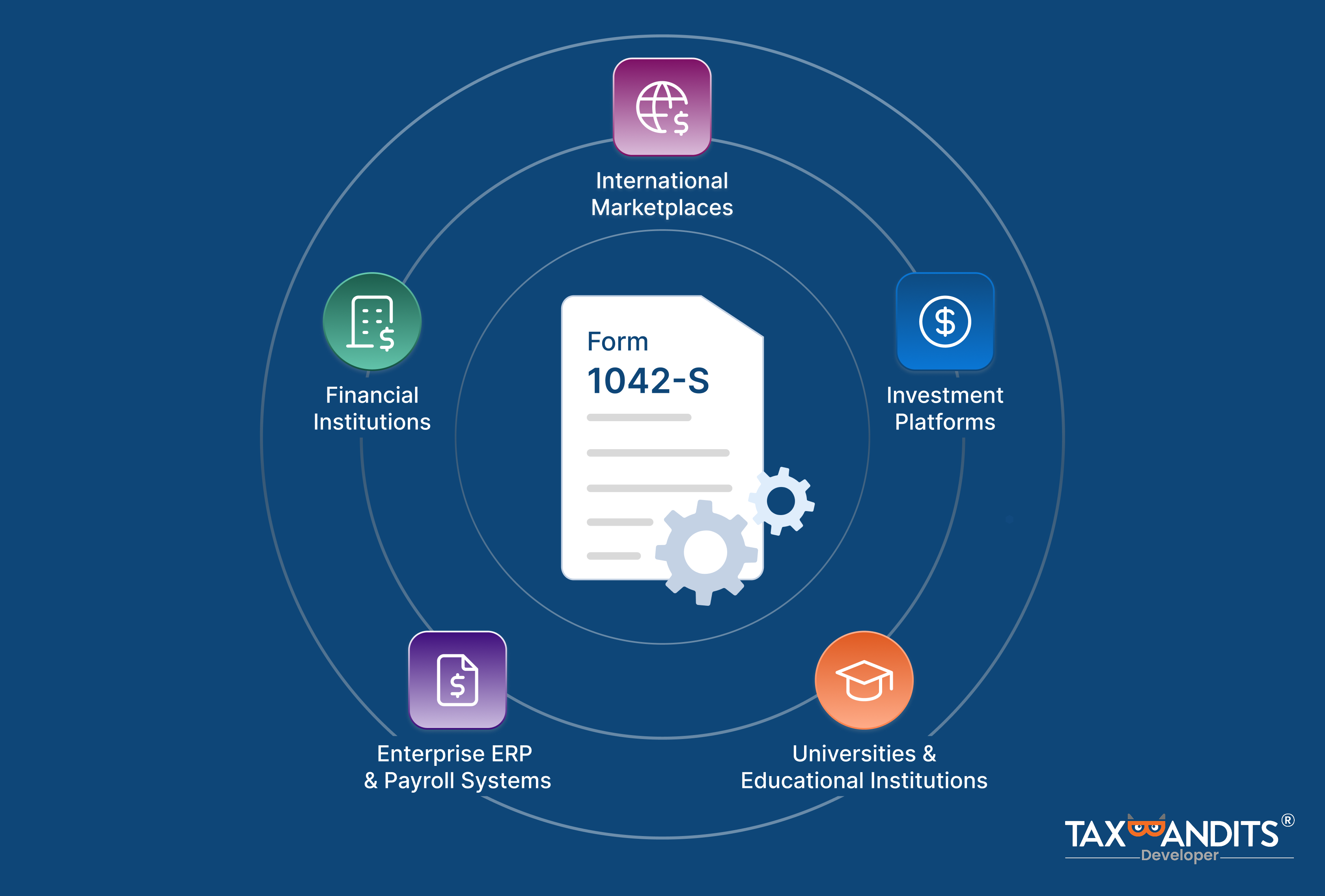
Where 1042-S Automation Becomes Essential
-
International Marketplaces
- Platforms paying foreign sellers or creators must issue 1042-S forms for U.S.-source earnings.
-
Financial Institutions & Investment Platforms
- Banks, brokerages, and fintech systems paying dividends or interest to non-resident clients must report withholding accurately under Chapter 3 or Chapter 4 rules.
-
Universities & Educational Institutions
- Scholarships, fellowships, and grants paid to foreign students require 1042-S reporting.
-
Enterprise ERP & Payroll Systems
- Large enterprises making cross-border vendor or contractor payments must integrate 1042-S reporting directly into their finance workflows.
How to Automate 1042-S with TaxBandits API
Before creating and transmitting Form 1042-S through the TaxBandits API, there are a few foundational steps you'll need to complete. These ensure that your integration is secure, properly authenticated, and ready to receive real-time filing updates.
Preliminary Steps
1. OAuth 2.0 Authentication
Before calling any TaxBandits API endpoint, your application must obtain an access token using OAuth 2.0.
-
Generate a JWT (JSON Web Token) using your API credentials
-
Exchange that JWT for an OAuth access token
-
Pass the token in the
Authorization: Bearer <token>header for all subsequent API calls For detailed information, click here.
3. Webhook Configuration
TaxBandits uses webhooks to notify your application about status changes related to filings. For 1042-S automation, you should configure the following webhooks in your developer console:
-
E-File Status Change: Notifies you when a 1042-S form has been accepted or rejected by the IRS.
-
Postal Mailing Sent : Triggered when the recipient copy of the Form 1042-S form has been mailed.
-
Online Access Status Change : Triggered when the recipient copy of the Form 1042-S is shared online, when the recipient provides consent, or when they access the form.
Once the preliminary steps are completed, you can proceed with the automation process.
Step 1: Create Form 1042-S
Once the initial setup is complete, create your 1042-S forms using the Form1042S/Create endpoint. You can create upto 250 forms in a single API request.
In the request JSON, you can also enable recipient distribution options such as:
- Postal Mailing (both domestic and international)
- Online Access for electronic delivery via secure online portal
During creation, the API validates your payload against:
- IRS schema rules and required field logic
- TaxBandits internal validations (formatting, structure, required dependencies)
If issues are found, the response includes error codes and messages, allowing you to correct and resubmit before transmitting.
{
 "SubmissionManifest": {
        "SubmissionId": null,
        "TaxYear": "2025",
        "IsFederalFiling": true,
        "IsPostal": true,
        "IsOnlineAccess": true,
        "IsScheduleFiling": true,
        "ScheduleFiling": {
            "EfileDate": "02/25/2026"
        }
    },
    "ReturnHeader": {
        "Business": {
            "BusinessId": null,
            "BusinessNm": "Snowdaze LLC",
            "FirstNm": null,
            "MiddleNm": null,
            "LastNm": null,
            "Suffix": null,
            "PayerRef": "Snow1234",
            "TradeNm": "Iceberg Icecreams",
            "IsEIN": true,
            "EINorSSN": "66-7908757",
            "Email": "james@sample.com",
            "ContactNm": "James",
            "Phone": "9934567890",
            "PhoneExtn": "12345",
            "Fax": "6934567890",
            "BusinessType": "ESTE",
            "SigningAuthority": {
                "Name": "James",
                "Phone": "9934567890",
                "BusinessMemberType": "ADMINISTRATOR"
            },
            "KindOfEmployer": "FederalGovt",
            "KindOfPayer": "REGULAR941",
            "IsBusinessTerminated": true,
            "Form1042SDetails": {
                "WHAgtCh3Cd": "11",
                "WHAgtCh4Cd": "16",
                "WHAgtGIIN": "123456.78901.LE.333",
                "FTIN": "12345",
                "Country": "AL"
            },
            "IsForeign": false,
            "USAddress": {
                "Address1": "15 Park Avenue",
                "Address2": "Louis St",
                "City": "Seattle",
                "State": "WA",
                "ZipCd": "98944"
            },
            "ForeignAddress": null
        }
    },
    "ReturnData": [
        {
            "RecordId": null,
            "SequenceId": "1",
            "IsOnlineAccess": true,
            "IsPostal": true,
            "Recipient": {
                "RecipientId": null,
                "TINType": "SSN",
                "TIN": "633191233",
                "FirstPayeeNm": null,
                "SecondPayeeNm": null,
                "FirstNm": "Nelson",
                "MiddleNm": "K",
                "LastNm": "Willsom",
                "Suffix": "Sr",
                "Form1042SDetails": {
                    "RecCh3Cd": "08",
                    "RecCh4Cd": "10",
                    "RecGIIN": "456445.56789.LE.444",
                    "FTIN": "32032",
                    "LOB": "02",
                    "DOB": "12-11-2000",
                    "Country": "CT"
                },
                "IsForeign": false,
                "USAddress": {
                    "Address1": "1005 Kinsey Rd",
                    "Address2": "Main St",
                    "City": "Dothan",
                    "State": "AL",
                    "ZipCd": "36303"
                },
                "ForeignAddress": null,
                "Email": "nelson@sample.com",
                "Fax": "9934567890",
                "Phone": "8834567890"
            },
            "Form1042SData": {
                "B1IncomeCd": "16",
                "B2GrossIncome": 1000,
                "B3IsChapter3": true,
                "Ch3Details": {
                    "B3aExemptionCd": "00",
                    "B3bTaxRate": "30"
                },
                "B3IsChapter4": false,
                "Ch4Details": {
                    "B4aExemptionCd": null,
                    "B4bTaxRate": null
                },
                "B5WHAllowance": 10,
                "B6NetIncome": 200,
                "B7aFedTaxWH": 50,
                "B7bIsFedWHNotDep": true,
                "B7cIsWHOccInSubYear": true,
                "B8TaxWHByOtherAgents": 10,
                "B9OverWHTaxRepaid": 10,
                "B10TotalWHCredit": 50,
                "B11TaxPaidByWHAgent": 120,
                "B13kRecipientAccNum": "32323213213",
                "B14PrimaryWHAgentDetails": {
                    "NameLine1": "Michalin",
                    "NameLine2": "C",
                    "EIN": "463456789"
                },
                "B15IsProRataReporting": true,
                "B15IntermediaryDetails": {
                    "NameLine1": "Nick",
                    "NameLine2": "T",
                    "NameLine3": "shawn",
                    "EIN": "534567890",
                    "IsForeign": false,
                    "USAddress": {
                        "Address1": "1751 Kinsey Rd",
                        "Address2": "Main St",
                        "City": "Dothan",
                        "State": "AL",
                        "ZipCd": "36303"
                    },
                    "ForeignAddress": null,
                    "GIIN": "231342.09876.LE.223",
                    "Ch3Cd": "21",
                    "Ch4Cd": "23",
                    "FTIN": "123213",
                    "Country": "US"
                },
                "B16PayerDetails": {
                    "Name": "smith",
                    "TINType": "EIN",
                    "TIN": "567897654",
                    "GIIN": "123213.87354.LE.665",
                    "Ch3Cd": "20",
                    "Ch4Cd": "20"
                },
                "B17State": {
                    "StateCd": "WV",
                    "StateIdNum": "99999999",
                    "StateTaxWH": "10"
                },
                "UniqueId": "1113499067"
            }
        }
    ]
}
Step 2: Review 1042-S (Optional but Recommended)
Before transmitting to the IRS, it’s good practice to review a generated draft—especially when data is coming from multiple systems (payments platform + W-8 collection + treaty logic + withholding calculations).
You can use the Form1042S/GetPDF endpoint to retrieve the draft version of the forms as PDF. If any changes are needed on the forms, you can use the Form1042S/Update endpoint.
 {
       "SubmissionManifest": {
        "SubmissionId": "822327b1-fa0f-4221-8f03-efdf4b54bf8e",
        "TaxYear": "2025",
        "IsFederalFiling": true,
        "IsPostal": true,
        "IsOnlineAccess": true,
        "IsScheduleFiling": true,
        "ScheduleFiling": {
            "EfileDate": "02/25/2026"
        }
    },
    "ReturnHeader": {
        "Business": {
            "BusinessId": "f01151f4-f6b6-4995-b605-1bae40c6ef87"
        }
    },
    "ReturnData": [
        {
            "RecordId": "15a24016-c591-41e1-95cf-f35b97c3c3f3",
            "SequenceId": "1",
            "IsOnlineAccess": true,
            "IsPostal": true,
            "Recipient": {
                "RecipientId": "569f11d1-86c6-46b6-8a13-c6692ae47f66",
                "TINType": "SSN",
                "TIN": "633191233",
                "FirstPayeeNm": null,
                "SecondPayeeNm": null,
                "FirstNm": "Nelson",
                "MiddleNm": "K",
                "LastNm": "Willsom",
                "Suffix": "VI",
                "Form1042SDetails": {
                    "RecCh3Cd": "08",
                    "RecCh4Cd": "10",
                    "RecGIIN": "456445.56789.LE.444",
                    "FTIN": "32032",
                    "LOB": "02",
                    "DOB": "12-12-2025",
                    "Country": "CT"
                },
                "IsForeign": false,
                "USAddress": {
                    "Address1": "1605 Kinsey Rd",
                    "Address2": "Main St",
                    "City": "Dothan",
                    "State": "AL",
                    "ZipCd": "36303"
                },
                "ForeignAddress": null,
                "Email": "nelson@sample.com",
                "Fax": "9934567890",
                "Phone": "8834567890"
            },
            "Form1042SData": {
                "B1IncomeCd": "16",
                "B2GrossIncome": 1060,
                "B3IsChapter3": true,
                "Ch3Details": {
                    "B3aExemptionCd": "00",
                    "B3bTaxRate": "30"
                },
                "B3IsChapter4": false,
                "Ch4Details": {
                    "B4aExemptionCd": null,
                    "B4bTaxRate": null
                },
                "B5WHAllowance": 10,
                "B6NetIncome": 200,
                "B7aFedTaxWH": 50,
                "B7bIsFedWHNotDep": true,
                "B7cIsWHOccInSubYear": true,
                "B8TaxWHByOtherAgents": 10,
                "B9OverWHTaxRepaid": 10,
                "B10TotalWHCredit": 50,
                "B11TaxPaidByWHAgent": 120,
                "B13kRecipientAccNum": "32323213213",
                "B14PrimaryWHAgentDetails": {
                    "NameLine1": "Michalin",
                    "NameLine2": "C",
                    "EIN": "463456789"
                },
                "B15IsProRataReporting": true,
                "B15IntermediaryDetails": {
                    "NameLine1": "Nick",
                    "NameLine2": "T",
                    "NameLine3": "shawn",
                    "EIN": "534567890",
                    "IsForeign": false,
                    "USAddress": {
                        "Address1": "1751 Kinsey Rd",
                        "Address2": "Main St",
                        "City": "Dothan",
                        "State": "AL",
                        "ZipCd": "36303"
                    },
                    "ForeignAddress": null,
                    "GIIN": "231342.09876.LE.223",
                    "Ch3Cd": "21",
                    "Ch4Cd": "23",
                    "FTIN": "123213",
                    "Country": "US"
                },
                "B16PayerDetails": {
                    "Name": "smith",
                    "TINType": "EIN",
                    "TIN": "567897654",
                    "GIIN": "123213.87354.LE.665",
                    "Ch3Cd": "20",
                    "Ch4Cd": "20"
                },
                "B17State": {
                    "StateCd": "WV",
                    "StateIdNum": "99999999",
                    "StateTaxWH": "10"
                },
                "UniqueId": "1113499067"
            }
        }
    ]
}
Step 3: Transmit 1042-S to the IRS
Once the forms are ready, you can use the Form1042S/Transmit endpoint to submit your 1042-S forms to the IRS.
{
    "SubmissionId": "822327b1-fa0f-4221-8f03-efdf4b54bf8e",
    "RecordIds": [
        "15a24016-c591-41e1-95cf-f35b97c3c3f3"
    ]
}
Step 4: Monitor Filing Status
After transmission, you can track the status of your 1042-S forms in two ways.
- Webhooks: If you’ve configured webhooks, you will receive automated status notifications to your application.
- Status endpoint: You can also call the Form1042S/Status endpoint to retrieve the status of your 1042-S forms.
{
    "StatusCode": 200,
    "StatusName": "Ok",
    "StatusMessage": "Successful API call",
    "SubmissionId": "822327b1-fa0f-4221-8f03-efdf4b54bf8e",
    "BusinessId": "f01151f4-f6b6-4995-b605-1bae40c6ef87",
    "PayerRef": "Snow1234",
    "FormType": "Form1042S",
    "Form1042SRecords": {
        "SuccessRecords": [
            {
                "SequenceId": "1",
                "RecordId": "15a24016-c591-41e1-95cf-f35b97c3c3f3",
                "RecipientId": "569f11d1-86c6-46b6-8a13-c6692ae47f66",
                "PayeeRef": null,
                "UniqueId": "1113499067",
                "FederalReturn": {
                    "Status": "TRANSMITTED",
                    "StatusTs": "2026-02-20 08:53:23 -05:00",
                    "Info": null,
                    "Errors": null
                },
                "StateReturns": null,
                "Postal": {
                    "Status": "SENT",
                    "StatusTs": "2026-02-20 08:53:23 -05:00",
                    "Info": null
                },
                "OnlineAccess": {
                    "Status": "EMAIL_SENT",
                    "Email": "nelson@sample.com",
                    "Info": null
                },
                "ScheduleFiling": {
                    "ScheduledOn": null,
                    "Info": "This service will be available soon"
                }
            }
        ],
        "ErrorRecords": null
    },
    "Errors": null
}
Step 5: Retransmit, If Rejected (Free)
If the IRS rejects your Form 1042-S, you can correct and retransmit it at no extra cost. Review the error message to identify what went wrong and use the Form1042S/Update endpoint to make the necessary changes.
Then, use the Form1042S/Transmit endpoint with the same SubmissionId to resend the return to the IRS.
Ready to simplify your 1042-S compliance?
Form 1042-S reporting is structurally complex and operationally sensitive. For platforms managing cross-border payments, automation is not simply a convenience—it is a compliance safeguard.
By integrating the TaxBandits API, your system can:
- Submit bulk 1042-S filings programmatically
- Enforce structured IRS validations
- Transmit securely
- Track status in real time
- Automate recipient distribution The result is a controlled, scalable, and audit-ready international reporting workflow embedded directly within your product infrastructure.