From Payloads to Plain Language- The TaxBandits Remote MCP Framework That Automates W-9s, 1099s and More

If you look closely at the history of automation, you'll notice a pattern: first, humans learn the system; then machines learn the humans.
Spreadsheets replaced calculators. APIs replaced paperwork. And now, AI is replacing the need to write code at all.
Today, the biggest shift in tax technology isn't a new IRS rule or a new form — it's the rise of natural-language interfaces that let businesses run entire tax workflows without writing a single line of code.
We're entering an age where systems don't wait for developers to craft payloads — they understand natural intent. Where workflows don't need glue code — they assemble themselves dynamically. And where automation isn't something you build, it's something you tell the system to execute.
That shift is being accelerated by something deceptively simple but incredibly powerful: Remote Model Context Protocol, or Remote MCP.
What Remote MCP Really Is
Remote MCP is a protocol that allows AI models to securely interact with tools, APIs, and data — based entirely on natural-language instructions. Instead of manually assembling JSON, orchestrating authentication, or interpreting error codes, users describe what they want, and the MCP client handles everything behind the scenes.
Imagine telling your system:
"Create a new customer and get their onboarding documents ready."
Remote MCP figures out:
- Which tools to call
- What parameters are needed
- How to structure the request
- How to authenticate
- How to validate
- How to deliver the final output back to you
All of this happens without you writing an integration, installing an SDK, or managing tokens.
In other words, Remote MCP is the runtime layer that lets AI act like an intelligent operator instead of a text generator.
This makes it a perfect match for industries with structured data, compliance constraints, and repetitive workflows — like tax compliance.
Why MCP Fits Naturally Into Tax Systems
Tax operations involve a blend of rules, validations, deadlines, and multi-step processes. Traditionally, API integrations for taxes required meticulous work: crafting correct payloads, handling OAuth, managing retries, parsing IRS codes, interpreting validation errors, and wiring together dozens of steps.
Remote MCP shifts the burden from the developer to the system. Users don’t build processes manually — they speak them into existence, and the system executes them safely. Tax workflows become intent-driven instead of implementation-heavy.
And that’s exactly where TaxBandits enters the picture.
TaxBandits’ Remote MCP Framework
TaxBandits has long been recognized for building one of the most complete tax automation APIs — W-9 collection, 1099 filing pipelines, payroll forms, and e-file transmissions. But even the best API requires a certain fluency: structuring data, writing code, and handling infrastructure.
With its new Remote MCP Server, TaxBandits removes that barrier entirely. Instead of thinking like a developer, users simply express what they want done. The MCP system interprets the request, chooses the correct TaxBandits function, validates the parameters, performs the action, and returns results — cleanly and coherently.
The API still powers everything, but the interface becomes conversational.
Businesses gain the power of the TaxBandits ecosystem without needing engineers to sit between them and their workflows.
Setting Up the TaxBandits Remote MCP Environment
Remote MCP works as a bridge between your AI client and the TaxBandits API ecosystem, which means the configuration layer is intentionally explicit about authentication, transport, and runtime behavior — while still keeping the user experience simple.
Getting started is intentionally simple.
The process begins in the Developer Console, where users retrieve two key credentials: the Client ID and MCP API Key. These identify your MCP client within the TaxBandits ecosystem. Unlike standard API keys used for direct REST calls, MCP credentials operate through a session-based model where authentication occurs over a secure SSE channel. Once the channel is established, your MCP client handles token refresh and session continuity automatically.
From the user’s perspective, the entire connection is defined inside a single JSON configuration entry. This is the only part of the system the user actually touches:
{
    "mcpServers": {
    "taxbandits_mcp": {
        "url": "https://ai-pubapimcp.spanllc.com/sse?authentication=CLIENT_ID,MCP_API_KEY"
        }
    }
}
This instructs the MCP client to connect to TaxBandits using Server-Sent Events over TLS, authenticate the session, and register all eligible TaxBandits tools for the AI model to use. The MCP client then performs a handshake that confirms tool availability, scopes the session, and exposes the full tool catalogue — W-9 workflows, 1099 generation functions, business creation functions, and so on.
From that moment, the TaxBandits API becomes something closer to an AI co-pilot. The system understands the tools at its disposal — W-9 commands, business creation, 1099 form operations — and invokes them intelligently as you converse with it.
You don’t write payloads…
You don’t manage authentication…
You don’t test endpoints…
You simply describe the outcome…
A Real Example: Requesting a W-9 Without Writing a Single Line of Code
Imagine you’ve hired a new contractor. Normally, you would:
- Call an endpoint
- Prepare a W-9 request payload
- Generate an email template
- Send the request
- Check the status manually
- Download the form later
Through the TaxBandits MCP Server, the entire workflow reduces to one instruction:
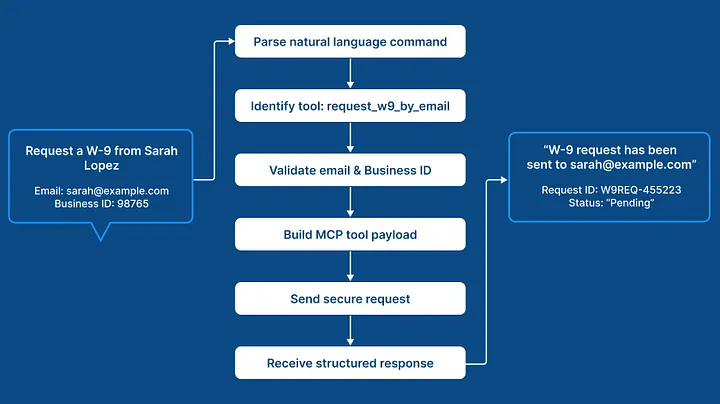
"Request a W-9 from Sarah Lopez. Her email is sarah@example.com. Use Business ID 98765."
When the AI model receives this command, it doesn’t fabricate a response. Instead, the MCP runtime breaks your instruction down into a set of machine-readable intents. It identifies that the action corresponds to the request_w9_by_email tool, extracts and validates parameters (recipient name, email, and business ID), and converts those parameters into a valid MCP tool invocation.
Under the hood, this means:
- The MCP runtime verifies that the client session is authenticated
- It constructs the correct input object required by the TaxBandits W-9 request function
- It handles any field normalization (e.g., email validation, ID format checks)
- It sends a strongly-typed request over the secure session
- It receives a structured response from the TaxBandits platform
- It relays that response back to the user in plain language
You’ll see something like:
W-9 request has been sent to sarah@example.com.
Request ID: W9REQ-456223
Status: Pending recipient submission.
No manual payloads. No handling HTTP status codes. No sifting through error bodies.
Later, when you follow up with:
"What’s the status of Sarah’s W-9?"
The system automatically switches tools. It knows this query relates to the original request, so it invokes the get_w9_status function with the correct identifiers, validates them, and retrieves the latest state from TaxBandits’ W-9 repository.
You may receive:
Status: Completed.
A finalized W-9 is available. Download URL: https://sarahw9.pdf
Behind the scenes, this involves secure document retrieval, scoped file access, and compliance-grade logging — but the MCP layer abstracts all of that away. You simply get the data you need.
The power of this example isn’t that a W-9 was requested. It’s that a process which normally requires six or seven separate API operations becomes a single conversational instruction. And the system still performs every compliance check, every validation, and every secure transmission step that the underlying IRS rules require.
Where This Takes the Tax Industry Next
Remote MCP represents more than a convenience layer. It’s a rethinking of how people interact with systems that have traditionally been complex, rule-heavy, and engineering-dependent. The work becomes faster, more intuitive, and more accessible for non-developers, while developers themselves are freed from repetitive plumbing.
In TaxBandits, it moves tax automation into a conversational model — one where businesses can manage W-9 collection, contractor onboarding, form validations, and 1099 filings without building infrastructure around it.
The same compliance engine, the same industry-grade validations, and the same end-to-end filing infrastructure now live behind a conversational interface that anyone in an organization can operate.
This isn’t replacing APIs.
It’s evolving how we access them.
And for the first time, tax automation becomes something you say, not something you build.
If you want to explore the functions, capabilities, and setup steps in more detail, you can find the full MCP server documentation here: https://developer.taxbandits.com/docs/mcp
The next generation of tax technology isn’t just about better APIs. It’s about changing how we interact with them — and TaxBandits is already leading that transformation.