TIN Tokenization
TIN Tokenization
The TIN Tokenization endpoint allows you to securely convert sensitive Taxpayer Identification Numbers into non-sensitive tokens before using them anywhere in the API. Once tokenized, the token can be used in place of the raw TIN across all supported downstream endpoints.
Raw TINs carry high compliance risk wherever they travel. TIN Tokenization replaces the TIN with a token upfront, so the raw value never has to move through your systems again. It helps you:
- Limit exposure. Fewer systems and payloads ever see the actual TIN.
- Avoid repeat work. Encrypt and submit once; reuse the token everywhere after.
- Share data safely. Tokens carry no identifiable taxpayer information, making them safe for logs, microservices, or third-party calls.
- Simplify batch workflows. Reference the same TIN across multiple downstream calls (e.g., a Business record and its related 1099 filings) using one token.
How It Works
TIN Tokenization uses a hybrid encryption model combining symmetric and asymmetric encryption to ensure the raw TIN never travels through your systems in plain text.
Before calling this endpoint, the TIN must be encrypted on the client side using the following approach:
Retrieve the RSA Public Key
Retrieve your RSA Public Key from the Developer Console under Settings -> Credentials -> TIN Tokenization. This key is unique to your account and is automatically generated when your account is created.
TaxBandits provides a 2048-bit RSA public key, which your application uses only to encrypt the AES key. The corresponding RSA private key is securely managed by TaxBandits and is never shared with clients.
Generate an AES Key
Generate a cryptographically secure random 256-bit (32-byte) AES key for each encryption operation. This key will be used to encrypt the TIN.
Encrypt the TIN using AES-GCM
Encrypt the plain-text TIN using AES-256-GCM with a randomly generated 96-bit (12-byte) nonce. A unique nonce must be generated for every encryption operation. AES-GCM provides both confidentiality and integrity protection.
Encrypt the AES Key using RSA-OAEP
Encrypt the AES key using the RSA Public Key with OAEP padding and SHA-256. This ensures the AES key can only be decrypted by TaxBandits using the corresponding RSA private key.
Encode and Submit
Base64-encode the encrypted TIN, nonce, and encrypted AES key. Submit them together in the request payload.
On the server side, TaxBandits decrypts the AES key using the RSA Private Key, decrypts the TIN using the AES key and nonce, validates the TIN, generates a unique token, and returns the token to your client.
Use the returned TINToken in place of the TIN in any downstream endpoint that accepts TINDetails.Format = "TOKENIZED_TIN" - including Business/Create, Recipient/Create, Form1099NEC/Create, and others.
Encryption Input Format
When submitting an encrypted TIN, provide the following three Base64-encoded values as the EncryptedTIN payload:
| Value | Description |
|---|---|
| EncryptedTIN | Base64-encoded AES-GCM ciphertext of the plain-text TIN |
| NONCE | Base64-encoded nonce used during AES-GCM encryption. Must be unique per TIN. |
| EncryptedKey | Base64-encoded RSA-OAEP encrypted AES key |
Never reuse a nonce with the same AES key. Never send a plain-text TIN to this endpoint.
Why Use TIN Tokenization
Raw TINs carry significant compliance risk wherever they travel. TIN Tokenization replaces the TIN with a token at the earliest point in your workflow, so the raw value never needs to move through your systems again.
- Limit exposure — Fewer systems and payloads ever see the actual TIN.
- Avoid repeat work — Encrypt and submit once; reuse the token everywhere after.
- Share data safely — Tokens carry no identifiable taxpayer information, making them safe for logs, microservices, or third-party calls.
- Simplify batch workflows — Reference the same TIN across multiple downstream calls (such as a Business record and its related 1099 filings) using one token.
You can tokenize up to 500 TINs in a single request payload.
Endpoint
POST /Utility/TINTokenization All requests require a Bearer token obtained through the OAuth 2.0 authentication flow. Learn more about OAuth 2.0
Request Body
| Field | Type | Description |
|---|---|---|
| EncryptedKey | String | Encrypted AEK (AES Encryption Key) used to encrypt the TIN before tokenization. |
| EncryptedTINDetails | Object[] | Array of TIN entries to tokenize. Multiple entries supported per request. |
| SequenceId | String | Optional Your reference ID for this entry, returned in the response for matching. Size Range: 50 characters |
| TINType | String | Type of TIN.Allowed values"EIN", "SSN", "QI-EIN", "ITIN", "WP-EIN", "WT-EIN", "NQI-EIN", "NA" |
| EncryptedTIN | String | Base64-encoded encrypted TIN value, produced using AES-GCM encryption as described above. |
| NONCE | String | Unique random nonce associated with the TIN during the encryption process. |
Response Body
| Field | Type | Description |
|---|---|---|
| SuccessRecords | Object[] | It will show the detailed information about the success status of TIN tokenized records. |
| SequenceId | String | Your reference ID, echoed back for matching. |
| TINToken | String | The generated token. Use this value in place of the raw TIN in all supported downstream endpoints by setting TINDetails.Format to TOKENIZED_TIN. |
| ErrorRecords | Object[] | It will show the detailed information about the error records. |
| SequenceId | String | Your reference ID, echoed back for matching. |
| Errors | Object[] | Present if any entry failed. Null when all entries succeed. |
| Id | String | Unique identifier for the validation error. |
| Name | String | Short name identifying the error type. |
| Message | String | Description of what went wrong. |
Using the Token in Downstream Endpoints
Once you have a TINToken, pass it in the TINDetails object of any supported endpoint by setting Format to TOKENIZED_TIN:
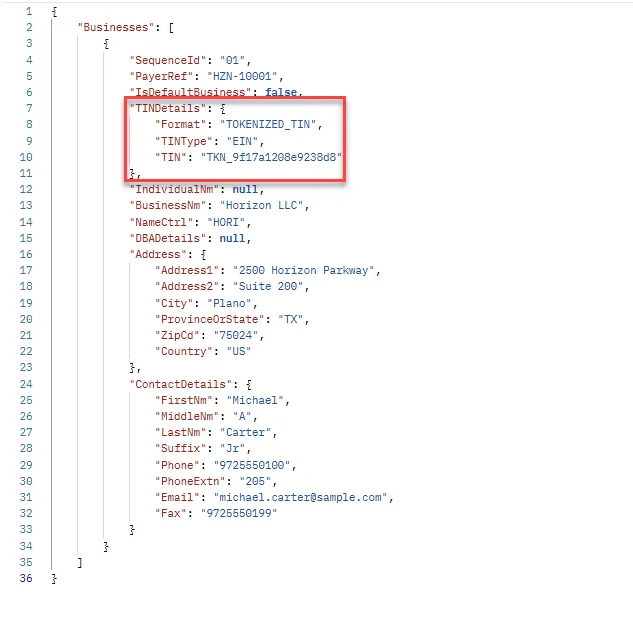
This is supported in Business/Create, Business/Update, Recipient/Create, Recipient/Update, Form1099NEC/Create, and all other endpoints that accept TINDetails.
Key Notes
- The RSA public key is unique to your account and is generated when your account is created. Retrieve it from the Developer Console before implementing client-side encryption.
- The RSA public key can be downloaded once and securely cached by your application. It does not need to be retrieved before every API request unless the key has been rotated.
- Never reuse a nonce with the same AES key. Generate a unique nonce for each TIN encryption operation.
- The AES key must never be transmitted in plain text. It must always be encrypted using the TaxBandits RSA public key before being included in the request.
- Base64 encoding is used only for data transport. It does not provide encryption or security.
- TIN tokens are stable within your account. The same TIN will always generate the same token, allowing the token to be securely stored and reused.
Security Considerations
- Use only the RSA public key downloaded from the TaxBandits Developer Console.
- Do not generate or upload your own RSA key pair for production use.
- Never expose, store, or transmit RSA private keys. The corresponding private key is securely managed by TaxBandits.
- Always use HTTPS when communicating with the TaxBandits API.
- Rotate or replace the RSA public key when instructed by TaxBandits.

Payload

Go Lang
Node.js
Python
.NET C#

Ruby
Java
| Sample | Description | Action |
|---|---|---|
| Sample 1 | Tokenize an encrypted SSN and receive a reusable `TINToken` for downstream endpoints. | |
| Sample 2 | Tokenize an encrypted EIN and receive a reusable `TINToken` for downstream endpoints. | |
| Sample 3 | Tokenize an encrypted QI-EIN and receive a reusable `TINToken` for downstream endpoints. | |
| Sample 4 | Tokenize an encrypted WP-EIN and receive a reusable `TINToken` for downstream endpoints. | |
| Sample 5 | Tokenize an encrypted WT-EIN and receive a reusable `TINToken` for downstream endpoints. | |
| Sample 6 | Tokenize an encrypted NQI-EIN and receive a reusable `TINToken` for downstream endpoints | |
| Sample 7 | Tokenize an encrypted ITIN and receive a reusable `TINToken` for downstream endpoints. |
Sample 1
{
  "EncryptedKey": "P4F6jUbA9PNeAiyhbRztr0DqC/DkgDuxdKsYj39f/ivxVRgBAPxsgae2Ej9TE/ssblNDuc0zrRDxS/s2yKtlNzI+fZdklWn0/j+zmrpVcTNosv/MV0u9DCmSDnnSpiVZ+ZNCP5SR+GhdFDs+831fa3CHSQZ+5CYJYv0lvxp1ihdMQd+bQCITfMKud1ZjUcZ2DiCjtEK1q+Yaf4u5+bNVTUgfIbRXmHVtRSQU1+AtCW2OyBb1OUZkKGcGF5XUdyG7YDnGPWpXUrLPJTKpoFb2slWibcyJ+OIhhoDES5uZd+q7YZdb9zvbSOuREiAn5bqdJeYiJiFDRoksZ9orzrj0wg==",
  "EncryptedTINDetails": [
    {
      "SequenceId": "001",
      "TINType": "SSN",
      "EncryptedTIN": "7dUAUVZopKd/retU8YQugZi0oe+uQnW4+Vo=",
      "NONCE": "eGUPYRR/vpKA98by"
    }
  ]
}
| Response | Description | Action |
|---|---|---|
| 200 | Success Response - This is a sample response for a successful TIN tokenization request. | |
| 207 | Validation Error Response - You will get the below response when one or more TIN records cannot be tokenized. | |
| 400 | Bad Request Response - You will get the below response when your API request contains validation errors. | |
| 401 | Unauthorized Response - You will get the below response when your API request does not contain valid authentication credentials. |
Response: 200
{
  "SuccessRecords": [
    {
      "SequenceId": "001",
      "TINToken": "TKN_e6b69183237ecffb"
    }
  ],
  "ErrorRecords": null,
  "Errors": null
}
  package main

  import (
    "crypto/aes"
    "crypto/cipher"
    "crypto/rand"
    "crypto/rsa"
    "crypto/sha256"
    "crypto/x509"
    "encoding/base64"
    "encoding/pem"
    "errors"
    "fmt"
    "io"
  )

  type EncryptedTINDetail struct {
    SequenceId   string
    TINType      string
    EncryptedTIN string
    NONCE         string
  }

  type EncryptionContext struct {
    aesKey []byte
    gcm    cipher.AEAD
  }

  func NewEncryptionContext() (*EncryptionContext, error) {
    aesKey := make([]byte, 32)
    if _, err := io.ReadFull(rand.Reader, aesKey); err != nil {
      return nil, err
    }

    block, err := aes.NewCipher(aesKey)
    if err != nil {
      return nil, err
    }

    gcm, err := cipher.NewGCM(block)
    if err != nil {
      return nil, err
    }

    return &EncryptionContext{
      aesKey: aesKey,
      gcm:    gcm,
    }, nil
  }

  func (ctx *EncryptionContext) EncryptTIN(sequenceID, tinType, tin string) (*EncryptedTINDetail, error) {

    // Generate a unique nonce for this TIN
    nonce := make([]byte, ctx.gcm.NonceSize())
    if _, err := io.ReadFull(rand.Reader, nonce); err != nil {
      return nil, err
    }

    cipherText := ctx.gcm.Seal(nil, nonce, []byte(tin), nil)

    return &EncryptedTINDetail{
      SequenceId:   sequenceId,
      TINType:      tinType,
      EncryptedTIN: base64.StdEncoding.EncodeToString(cipherText),
      NONCE :        base64.StdEncoding.EncodeToString(nonce),
    }, nil
  }

  func (ctx *EncryptionContext) EncryptAESKey(publicKeyPEM string) (string, error) {

    blockPEM, _ := pem.Decode([]byte(publicKeyPEM))
    if blockPEM == nil {
      return "", errors.New("invalid public key")
    }

    pubInterface, err := x509.ParsePKIXPublicKey(blockPEM.Bytes)
    if err != nil {
      return "", err
    }

    publicKey, ok := pubInterface.(*rsa.PublicKey)
    if !ok {
      return "", errors.New("invalid RSA public key")
    }

    encryptedKey, err := rsa.EncryptOAEP(
      sha256.New(),
      rand.Reader,
      publicKey,
      ctx.aesKey,
      nil,
    )
    if err != nil {
      return "", err
    }

    return base64.StdEncoding.EncodeToString(encryptedKey), nil
  }

  func main() {
      publicKey := `-----BEGIN PUBLIC KEY-----
        YOUR_PUBLIC_KEY_HERE
        -----END PUBLIC KEY-----`

    // One AES key for the entire request
    ctx, err := NewEncryptionContext()
    if err != nil {
      panic(err)
    }

    // Encrypt the AES key once
    encryptedKey, err := ctx.EncryptAESKey(publicKey)
    if err != nil {
      panic(err)
    }

    // Encrypt multiple TINs
    tins := []struct {
      SequenceId string
      TINType    string
      TIN        string
    }{
      {"001", "SSN", "*********"},
      {"002", "SSN", "*********"},
      {"003", "EIN", "*********"},
    }

    var details []*EncryptedTINDetail

    for _, t := range tins {
      detail, err := ctx.EncryptTIN(t.SequenceId, t.TINType, t.TIN)
      if err != nil {
        panic(err)
      }
      details = append(details, detail)
    }

    fmt.Println("EncryptedKey:", encryptedKey)

    for _, d := range details {
      fmt.Printf("%+v
", *d)
    }
  }
  const crypto = require("crypto");

/**
* Represents the encryption context for a single API request.
*
* One AES-256 key is generated per request and reused to encrypt
* all TINs in that request.
*/
class EncryptionContext {
constructor() {
  // Generate a random 256-bit AES key.
  this.aesKey = crypto.randomBytes(32);

  // AES-GCM uses a 12-byte nonce (IV).
  this.nonceLength = 12;
}

/**
 * Encrypts a single TIN using AES-256-GCM.
 *
 * A unique cryptographically secure nonce is generated
 * for every TIN.
 *
 * @param {string} sequenceId
 * @param {string} tinType
 * @param {string} tin
 * @returns {Object}
 */
encryptTIN(sequenceId, tinType, tin) {
  // Generate a unique nonce.
  const nonce = crypto.randomBytes(this.nonceLength);

  // Create AES-GCM cipher.
  const cipher = crypto.createCipheriv("aes-256-gcm", this.aesKey, nonce);

  // Encrypt the TIN.
  const encrypted = Buffer.concat([
    cipher.update(tin, "utf8"),
    cipher.final(),
  ]);

  // AES-GCM authentication tag.
  const authTag = cipher.getAuthTag();

  // Combine ciphertext + authentication tag.
  const encryptedTIN = Buffer.concat([encrypted, authTag]);

  return {
    SequenceId: sequenceId,
    TINType: tinType,
    EncryptedTIN: encryptedTIN.toString("base64"),
    NONCE : nonce.toString("base64"),
  };
}

/**
 * Encrypts the AES key using the TaxBandits RSA public key.
 *
 * Obtain the RSA public key from the
 * TaxBandits Developer Console.
 *
 * Algorithm:
 *  RSA-OAEP
 *  SHA-256
 *
 * @param {string} publicKeyPem
 * @returns {string}
 */
encryptAESKey(publicKeyPem) {
  const encryptedKey = crypto.publicEncrypt(
    {
      key: publicKeyPem,
      padding: crypto.constants.RSA_PKCS1_OAEP_PADDING,
      oaepHash: "sha256",
    },
    this.aesKey,
  );

  return encryptedKey.toString("base64");
}
}

// --------------------------------------------------------------------
// Obtain the RSA Public Key from the TaxBandits Developer Console.
//
// Replace the placeholder below with your public key.
// --------------------------------------------------------------------
const publicKey = `-----BEGIN PUBLIC KEY-----
YOUR_PUBLIC_KEY_HERE
-----END PUBLIC KEY-----`;

// Create one encryption context.
//
// One AES key will be used for the entire request.
const context = new EncryptionContext();

// Encrypt the AES key once.
const encryptedKey = context.encryptAESKey(publicKey);

// Sample TINs.
const tins = [
{
  SequenceId: "001",
  TINType: "SSN",
  TIN: "*********",
},
{
  SequenceId: "002",
  TINType: "SSN",
  TIN: "*********",
},
{
  SequenceId: "003",
  TINType: "EIN",
  TIN: "*********",
},
];

// Encrypt all TINs.
const encryptedTINDetails = [];

for (const tin of tins) {
encryptedTINDetails.push(
  context.encryptTIN(tin.SequenceId, tin.TINType, tin.TIN),
);
}

// Build the request payload.
const request = {
EncryptedKey: encryptedKey,
EncryptedTINDetails: encryptedTINDetails,
};

console.log(JSON.stringify(request, null, 4));
}
Prerequisite
Install the required package:
pip install cryptography
  import base64
  import os

  from cryptography.hazmat.primitives import hashes
  from cryptography.hazmat.primitives.asymmetric import padding
  from cryptography.hazmat.primitives.ciphers.aead import AESGCM
  from cryptography.hazmat.primitives.serialization import load_pem_public_key

  class EncryptedTINDetail:
      """
      Represents an encrypted TIN that will be sent in
      EncryptedTINDetails.
      """


      def __init__(self, sequence_id, tin_type, encrypted_tin, nonce):
          self.sequence_id = sequence_id
          self.tin_type = tin_type
          self.encrypted_tin = encrypted_tin
          self.nonce = nonce


  class EncryptionContext:
      """
      Maintains the encryption context for a single API request.


      One AES-256 key is generated per request and reused to encrypt
      all TINs in that request.


      Each TIN is encrypted using a unique random nonce.
      """


      def __init__(self):
          # Generate a random 256-bit AES key.
          self.aes_key = AESGCM.generate_key(bit_length=256)
          self.aesgcm = AESGCM(self.aes_key)


      def encrypt_tin(self, sequence_id, tin_type, tin):
          """
          Encrypts a single TIN using AES-256-GCM.


          A unique nonce is generated for every TIN.
          """


          # AES-GCM uses a 12-byte nonce.
          nonce = os.urandom(12)


          encrypted = self.aesgcm.encrypt(
              nonce,
              tin.encode("utf-8"),
              None
          )


          return EncryptedTINDetail(
              sequence_id=sequence_id,
              tin_type=tin_type,
              encrypted_tin=base64.b64encode(encrypted).decode(),
              nonce=base64.b64encode(nonce).decode()
          )


      def encrypt_aes_key(self, public_key_pem):
          """
          Encrypts the AES key using the TaxBandits RSA public key.


          Obtain the RSA public key from the
          TaxBandits Developer Console.


          Algorithm:
              RSA-OAEP with SHA-256
          """


          public_key = load_pem_public_key(
              public_key_pem.encode("utf-8")
          )


          encrypted_key = public_key.encrypt(
              self.aes_key,
              padding.OAEP(
                  mgf=padding.MGF1(
                      algorithm=hashes.SHA256()
                  ),
                  algorithm=hashes.SHA256(),
                  label=None
              )
          )


          return base64.b64encode(encrypted_key).decode()


  def main():
      # ------------------------------------------------------------
      # Obtain the RSA Public Key from the TaxBandits Developer
      # Console.
      #
      # Replace the placeholder below with your public key.
      # ------------------------------------------------------------


      public_key = """
  -----BEGIN PUBLIC KEY-----
  -------------------------
  -----END PUBLIC KEY-----
  """


      # Create a new encryption context.
      #
      # One AES key will be used for the entire request.


      context = EncryptionContext()


      # Encrypt the AES key once.


      encrypted_key = context.encrypt_aes_key(public_key)


      # Sample TINs.
      #
      # Replace the masked values with actual TINs before
      # encrypting in production.


      tins = [
          {
              "SequenceId": "001",
              "TINType": "SSN",
              "TIN": "*********"
          },
          {
              "SequenceId": "002",
              "TINType": "SSN",
              "TIN": "*********"
          },
          {
              "SequenceId": "003",
              "TINType": "EIN",
              "TIN": "*********"
          }
      ]


      encrypted_tin_details = []


      # Encrypt each TIN.
      #
      # A new nonce is generated for every TIN while reusing
      # the same AES key for this request.


      for tin in tins:


          encrypted_tin_details.append(
              context.encrypt_tin(
                  tin["SequenceId"],
                  tin["TINType"],
                  tin["TIN"]
              )
          )


      print("EncryptedKey:")
      print(encrypted_key)


      print("
EncryptedTINDetails:")


      for detail in encrypted_tin_details:


          print("-------------------------------------")
          print(f"SequenceId   : {detail.sequence_id}")
          print(f"TINType      : {detail.tin_type}")
          print(f"EncryptedTIN : {detail.encrypted_tin}")
          print(f"NONCE         : {detail.nonce}")


      #
      # The request payload should look like:
      #
      # {
      #   "EncryptedKey": "...",
      #   "EncryptedTINDetails": [
      #     {
      #       "SequenceId": "001",
      #       "TINType": "SSN",
      #       "EncryptedTIN": "...",
      #       "NONCE ": "..."
      #     },
      #     {
      #       "SequenceId": "002",
      #       "TINType": "SSN",
      #       "EncryptedTIN": "...",
      #       "NONCE ": "..."
      #     },
      #     {
      #       "SequenceId": "003",
      #       "TINType": "EIN",
      #       "EncryptedTIN": "...",
      #       "NONCE ": "..."
      #     }
      #   ]
      # }


  if __name__ == "__main__":
      main()
Note: This example uses the built-in AesGcm and RSA classes available in .NET 6 and later.
  using System;
  using System.Collections.Generic;
  using System.Security.Cryptography;
  using System.Text;

  namespace HybridEncryptionSample
  {
      /// <summary>
      /// Represents an encrypted TIN that will be sent in
      /// EncryptedTINDetails.
      /// </summary>
      public class EncryptedTINDetail
      {
          public string SequenceId { get; set; }

          public string TINType { get; set; }

          public string EncryptedTIN { get; set; }

          public string NONCE  { get; set; }
      }

      /// <summary>
      /// Maintains the encryption context for a single API request.
      ///
      /// One AES-256 key is generated per request and reused to encrypt
      /// all TINs in that request.
      ///
      /// Each TIN is encrypted using a unique random nonce.
      /// </summary>
      public class EncryptionContext
      {
          private readonly byte[] _aesKey;

          /// <summary>
          /// Creates a new encryption context.
          ///
          /// A random 256-bit AES key is generated.
          /// </summary>
          public EncryptionContext()
          {
              _aesKey = RandomNumberGenerator.GetBytes(32);
          }

          /// <summary>
          /// Encrypts a single TIN using AES-256-GCM.
          ///
          /// A unique nonce is generated for every TIN.
          /// </summary>
          public EncryptedTINDetail EncryptTIN(
              string sequenceId,
              string tinType,
              string tin)
          {
              // AES-GCM uses a 12-byte nonce.
              byte[] nonce = RandomNumberGenerator.GetBytes(12);

              byte[] plainText = Encoding.UTF8.GetBytes(tin);

              byte[] cipherText = new byte[plainText.Length];

              byte[] tag = new byte[16];

              using var aes = new AesGcm(_aesKey);

              aes.Encrypt(
                  nonce,
                  plainText,
                  cipherText,
                  tag);

              // Combine ciphertext + authentication tag.
              byte[] encrypted = new byte[cipherText.Length + tag.Length];

              Buffer.BlockCopy(cipherText, 0, encrypted, 0, cipherText.Length);

              Buffer.BlockCopy(tag, 0, encrypted, cipherText.Length, tag.Length);

              return new EncryptedTINDetail
              {
                  SequenceId = sequenceId,
                  TINType = tinType,
                  EncryptedTIN = Convert.ToBase64String(encrypted),
                  NONCE  = Convert.ToBase64String(nonce)
              };
          }

          /// <summary>
          /// Encrypts the AES key using the TaxBandits RSA public key.
          ///
          /// Obtain the RSA public key from the
          /// TaxBandits Developer Console.
          ///
          /// Algorithm:
          /// RSA-OAEP SHA-256
          /// </summary>
          public string EncryptAESKey(string publicKeyPem)
          {
              using RSA rsa = RSA.Create();

              rsa.ImportFromPem(publicKeyPem);

              byte[] encryptedKey = rsa.Encrypt(
                  _aesKey,
                  RSAEncryptionPadding.OaepSHA256);

              return Convert.ToBase64String(encryptedKey);
          }
      }

      class Program
      {
          static void Main()
          {
              // ------------------------------------------------------------
              // Obtain the RSA Public Key from the TaxBandits Developer
              // Console.
              //
              // Replace the placeholder below with your public key.
              // ------------------------------------------------------------

              string publicKey = @"
  -----BEGIN PUBLIC KEY-----
  YOUR_PUBLIC_KEY_HERE
  -----END PUBLIC KEY-----";

              // Create a new encryption context.
              //
              // One AES key will be used for the entire request.

              EncryptionContext context = new EncryptionContext();

              // Encrypt the AES key once.

              string encryptedKey = context.EncryptAESKey(publicKey);

              // Sample TINs.

              var tins = new[]
              {
                  new
                  {
                      SequenceId = "001",
                      TINType = "SSN",
                      TIN = "*********"
                  },
                  new
                  {
                      SequenceId = "002",
                      TINType = "SSN",
                      TIN = "*********"
                  },
                  new
                  {
                      SequenceId = "003",
                      TINType = "EIN",
                      TIN = "*********"
                  }
              };

              List<EncryptedTINDetail> encryptedTINDetails = new();

              foreach (var tin in tins)
              {
                  encryptedTINDetails.Add(
                      context.EncryptTIN(
                          tin.SequenceId,
                          tin.TINType,
                          tin.TIN));
              }

              Console.WriteLine($"EncryptedKey: {encryptedKey}");

              Console.WriteLine();

              foreach (var item in encryptedTINDetails)
              {
                  Console.WriteLine($"SequenceId   : {item.SequenceId}");
                  Console.WriteLine($"TINType      : {item.TINType}");
                  Console.WriteLine($"EncryptedTIN : {item.EncryptedTIN}");
                  Console.WriteLine($"NONCE         : {item.NONCE }");
                  Console.WriteLine();
              }

              // ------------------------------------------------------------
              // Request Payload
              //
              // {
              //     "EncryptedKey": "...",
              //     "EncryptedTINDetails": [
              //         {
              //             "SequenceId": "001",
              //             "TINType": "SSN",
              //             "EncryptedTIN": "...",
              //             "NONCE ": "..."
              //         }
              //     ]
              // }
              // ------------------------------------------------------------
          }
      }
  }
Prerequisite: This example uses Ruby's built-in OpenSSL library, so no additional gems are required.
  require 'openssl'
  require 'base64'

  #
  # Represents an encrypted TIN that will be sent in
  # EncryptedTINDetails.
  #
  class EncryptedTINDetail

    attr_accessor :sequence_id,
                  :tin_type,
                  :encrypted_tin,
                  :nonce

    def initialize(sequence_id, tin_type, encrypted_tin, nonce)
      @sequence_id = sequence_id
      @tin_type = tin_type
      @encrypted_tin = encrypted_tin
      @nonce = nonce
    end

  end

  #
  # Maintains the encryption context for a single API request.
  #
  # One AES-256 key is generated per request and reused to encrypt
  # all TINs in that request.
  #
  # Each TIN is encrypted using a unique random nonce.
  #
  class EncryptionContext

    def initialize

      #
      # Generate a random 256-bit AES key.
      #
      @aes_key = OpenSSL::Random.random_bytes(32)

    end

    #
    # Encrypts a single TIN using AES-256-GCM.
    #
    # A unique nonce is generated for every TIN.
    #
    def encrypt_tin(sequence_id, tin_type, tin)

      #
      # AES-GCM uses a 12-byte nonce.
      #
      nonce = OpenSSL::Random.random_bytes(12)

      cipher = OpenSSL::Cipher.new("aes-256-gcm")
      cipher.encrypt

      cipher.key = @aes_key
      cipher.iv = nonce

      encrypted = cipher.update(tin) + cipher.final

      #
      # AES-GCM authentication tag.
      #
      auth_tag = cipher.auth_tag

      #
      # Combine ciphertext + authentication tag.
      #
      encrypted_tin = encrypted + auth_tag

      EncryptedTINDetail.new(
        sequence_id,
        tin_type,
        Base64.strict_encode64(encrypted_tin),
        Base64.strict_encode64(nonce)
      )

    end

    #
    # Encrypts the AES key using the TaxBandits RSA public key.
    #
    # Obtain the RSA public key from the
    # TaxBandits Developer Console.
    #
    # Algorithm:
    #   RSA-OAEP with SHA-256
    #
    def encrypt_aes_key(public_key_pem)

      public_key = OpenSSL::PKey::RSA.new(public_key_pem)

      encrypted_key = public_key.public_encrypt(
        @aes_key,
        OpenSSL::PKey::RSA::PKCS1_OAEP_PADDING
      )

      Base64.strict_encode64(encrypted_key)

    end

  end

  #
  # ------------------------------------------------------------
  # Obtain the RSA Public Key from the TaxBandits Developer
  # Console.
  #
  # Replace the placeholder below with your public key.
  # ------------------------------------------------------------
  #
  public_key = <<~PEM
  -----BEGIN PUBLIC KEY-----
  YOUR_PUBLIC_KEY_HERE
  -----END PUBLIC KEY-----
  PEM

  #
  # Create a new encryption context.
  #
  # One AES key will be used for the entire request.
  #
  context = EncryptionContext.new

  #
  # Encrypt the AES key once.
  #
  encrypted_key = context.encrypt_aes_key(public_key)

  #
  # Sample TINs.
  #
  # Replace the masked values with actual TINs before
  # encrypting in production.
  #
  tins = [
    {
      sequence_id: "001",
      tin_type: "SSN",
      tin: "*********"
    },
    {
      sequence_id: "002",
      tin_type: "SSN",
      tin: "*********"
    },
    {
      sequence_id: "003",
      tin_type: "EIN",
      tin: "*********"
    }
  ]

  encrypted_tin_details = []

  #
  # Encrypt each TIN.
  #
  # A new nonce is generated for every TIN while reusing
  # the same AES key for this request.
  #
  tins.each do |tin|

    encrypted_tin_details << context.encrypt_tin(
      tin[:sequence_id],
      tin[:tin_type],
      tin[:tin]
    )

  end

  puts "EncryptedKey:"
  puts encrypted_key

  puts
  puts "EncryptedTINDetails:"

  encrypted_tin_details.each do |detail|

    puts "-------------------------------------"
    puts "SequenceId   : #{detail.sequence_id}"
    puts "TINType      : #{detail.tin_type}"
    puts "EncryptedTIN : #{detail.encrypted_tin}"
    puts "NONCE         : #{detail.nonce}"

  end

  #
  # The request payload should look like:
  #
  # {
  #   "EncryptedKey": "...",
  #   "EncryptedTINDetails": [
  #     {
  #       "SequenceId": "001",
  #       "TINType": "SSN",
  #       "EncryptedTIN": "...",
  #       "NONCE ": "..."
  #     },
  #     {
  #       "SequenceId": "002",
  #       "TINType": "SSN",
  #       "EncryptedTIN": "...",
  #       "NONCE ": "..."
  #     },
  #     {
  #       "SequenceId": "003",
  #       "TINType": "EIN",
  #       "EncryptedTIN": "...",
  #       "NONCE ": "..."
  #     }
  #   ]
  # }
  #
Prerequisites
- JDK 8 or later
- JCE Unlimited Strength enabled
  import javax.crypto.Cipher;
  import javax.crypto.KeyGenerator;
  import javax.crypto.SecretKey;
  import javax.crypto.spec.GCMParameterSpec;
  import java.nio.charset.StandardCharsets;
  import java.security.KeyFactory;
  import java.security.PublicKey;
  import java.security.SecureRandom;
  import java.security.spec.X509EncodedKeySpec;
  import java.util.ArrayList;
  import java.util.Base64;
  import java.util.List;

  public class HybridEncryptionSample {

      /**
       * Represents an encrypted TIN that will be sent in
       * EncryptedTINDetails.
       */
      static class EncryptedTINDetail {
          String sequenceId;
          String tinType;
          String encryptedTIN;
          String nonce;

          public EncryptedTINDetail(String sequenceId, String tinType,
                                    String encryptedTIN, String nonce) {
              this.sequenceId = sequenceId;
              this.tinType = tinType;
              this.encryptedTIN = encryptedTIN;
              this.nonce = nonce;
          }
      }

      /**
       * Maintains the encryption context for a single API request.
       *
       * One AES-256 key is generated per request and reused to encrypt
       * all TINs in that request.
       *
       * Each TIN is encrypted using a unique random nonce.
       */
      static class EncryptionContext {

          private final SecretKey aesKey;
          private final SecureRandom secureRandom = new SecureRandom();

          /**
           * Creates a new encryption context.
           *
           * A random 256-bit AES key is generated.
           */
          public EncryptionContext() throws Exception {

              KeyGenerator keyGenerator = KeyGenerator.getInstance("AES");
              keyGenerator.init(256);

              aesKey = keyGenerator.generateKey();
          }

          /**
           * Encrypts a single TIN using AES-256-GCM.
           *
           * A unique nonce is generated for every TIN.
           */
          public EncryptedTINDetail encryptTIN(
                  String sequenceId,
                  String tinType,
                  String tin) throws Exception {

              // AES-GCM uses a 12-byte nonce.
              byte[] nonce = new byte[12];
              secureRandom.nextBytes(nonce);

              Cipher cipher = Cipher.getInstance("AES/GCM/NoPadding");

              GCMParameterSpec gcmSpec = new GCMParameterSpec(128, nonce);

              cipher.init(Cipher.ENCRYPT_MODE, aesKey, gcmSpec);

              byte[] encrypted = cipher.doFinal(
                      tin.getBytes(StandardCharsets.UTF_8));

              return new EncryptedTINDetail(
                      sequenceId,
                      tinType,
                      Base64.getEncoder().encodeToString(encrypted),
                      Base64.getEncoder().encodeToString(nonce)
              );
          }

          /**
           * Encrypts the AES key using the TaxBandits RSA public key.
           *
           * Obtain the RSA public key from the
           * TaxBandits Developer Console.
           *
           * Algorithm:
           * RSA-OAEP with SHA-256
           */
          public String encryptAESKey(String publicKeyPem) throws Exception {

              PublicKey publicKey = loadPublicKey(publicKeyPem);

              Cipher cipher = Cipher.getInstance(
                      "RSA/ECB/OAEPWithSHA-256AndMGF1Padding");

              cipher.init(Cipher.ENCRYPT_MODE, publicKey);

              byte[] encryptedKey = cipher.doFinal(aesKey.getEncoded());

              return Base64.getEncoder().encodeToString(encryptedKey);
          }

          /**
           * Loads a PEM formatted RSA public key.
           */
          private PublicKey loadPublicKey(String pem) throws Exception {

              String key = pem
                      .replace("-----BEGIN PUBLIC KEY-----", "")
                      .replace("-----END PUBLIC KEY-----", "")
                      .replaceAll("\s+", "");

              byte[] decoded = Base64.getDecoder().decode(key);

              X509EncodedKeySpec keySpec =
                      new X509EncodedKeySpec(decoded);

              KeyFactory keyFactory = KeyFactory.getInstance("RSA");

              return keyFactory.generatePublic(keySpec);
          }
      }

      public static void main(String[] args) throws Exception {

          // ------------------------------------------------------------
          // Obtain the RSA Public Key from the TaxBandits Developer
          // Console.
          //
          // Replace the placeholder below with your public key.
          // ------------------------------------------------------------

          String publicKey = """
                  -----BEGIN PUBLIC KEY-----
                  YOUR_PUBLIC_KEY_HERE
                  -----END PUBLIC KEY-----
                  """;

          // Create a new encryption context.
          //
          // One AES key will be used for the entire request.

          EncryptionContext context = new EncryptionContext();

          // Encrypt the AES key once.

          String encryptedKey = context.encryptAESKey(publicKey);

          // Sample TINs.
          //
          // Replace the masked values with actual TINs before
          // encrypting in production.

          List<String[]> tins = List.of(
                  new String[]{"001", "SSN", "*********"},
                  new String[]{"002", "SSN", "*********"},
                  new String[]{"003", "EIN", "*********"}
          );

          List<EncryptedTINDetail> encryptedTINDetails = new ArrayList<>();

          // Encrypt each TIN.
          //
          // A new nonce is generated for every TIN while reusing
          // the same AES key for this request.

          for (String[] tin : tins) {

              encryptedTINDetails.add(
                      context.encryptTIN(
                              tin[0],
                              tin[1],
                              tin[2]
                      )
              );
          }

          // Display encrypted payload.

          System.out.println("EncryptedKey:");
          System.out.println(encryptedKey);

          System.out.println();

          System.out.println("EncryptedTINDetails:");

          for (EncryptedTINDetail detail : encryptedTINDetails) {

              System.out.println("-------------------------------------");
              System.out.println("SequenceId   : " + detail.sequenceId);
              System.out.println("TINType      : " + detail.tinType);
              System.out.println("EncryptedTIN : " + detail.encryptedTIN);
              System.out.println("NONCE         : " + detail.nonce);
          }

          /*
          * The request payload should look like:
          *
          * {
          *   "EncryptedKey": "...",
          *   "EncryptedTINDetails": [
          *     {
          *       "SequenceId": "001",
          *       "TINType": "SSN",
          *       "EncryptedTIN": "...",
          *       "NONCE ": "..."
          *     },
          *     {
          *       "SequenceId": "002",
          *       "TINType": "SSN",
          *       "EncryptedTIN": "...",
          *       "NONCE ": "..."
          *     },
          *     {
          *       "SequenceId": "003",
          *       "TINType": "EIN",
          *       "EncryptedTIN": "...",
          *       "NONCE ": "..."
          *     }
          *   ]
          * }
          */
      }
  }